You can now pay for Cloudflare services directly from your bank account using Instant Bank Payments via Link.
Link ↗ now supports bank account payments in addition to cards. If you have a bank account saved in Link, it appears as a payment option at checkout. If not, you can connect one during the checkout flow.
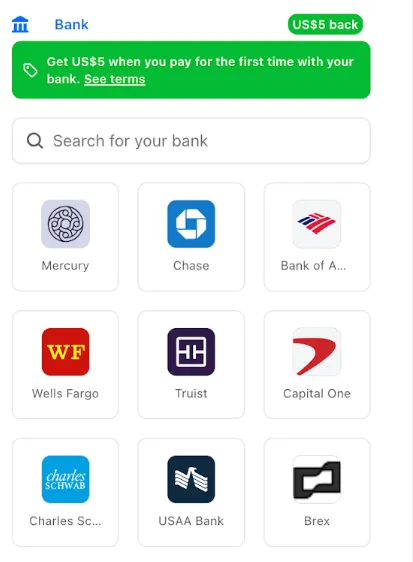
- During checkout, select your bank account from your saved Link payment methods.
- Confirm the payment.
After your first Link authentication, your bank account is available for future purchases without re-entering details.
Instant Bank Payments via Link is available to US-based self-serve accounts across all Cloudflare products. Your existing cards remain available at checkout.
Bank-based Link payments appear in your billing history with the payment method shown as
linkand last four digits as0000. For details, refer to the Instant Bank Payments via Link documentation.
The Gateway Authorization Proxy and hosted PAC files are now generally available for all plan types.
Authorization proxy endpoints add an identity-aware option alongside the existing source IP proxy endpoints, using Cloudflare Access authentication to verify who a user is before applying Gateway filtering — without installing the Cloudflare One Client. Cloudflare-hosted PAC files let you create and distribute PAC files directly from Cloudflare One on Cloudflare's global network.
These features are ideal for environments where deploying a device client is not an option, such as virtual desktops (VDI) or compliance-restricted endpoints.
To get started, refer to the proxy endpoints documentation.
You can now connect Hyperdrive to a private database through a Workers VPC service. This is the recommended way to connect Hyperdrive to a private database that is not exposed to the public Internet.
When creating a Hyperdrive configuration in the Cloudflare dashboard, choose Connect to private database and then Workers VPC. From there, you can select an existing VPC service or create a new one inline by picking a Cloudflare Tunnel and entering your origin host and TCP port.
You can also create a Hyperdrive configuration backed by a Workers VPC service from the command line:
Terminal window npx wrangler hyperdrive create my-vpc-database \--service-id <YOUR_VPC_SERVICE_ID> \--database <DATABASE_NAME> \--user <DATABASE_USER> \--password <DATABASE_PASSWORD> \--scheme postgresqlWorkers VPC services are reusable across Hyperdrive configurations and can also be bound directly to Workers, so you can share the same private connection across multiple products.
To get started, refer to Connect Hyperdrive to a private database using Workers VPC.
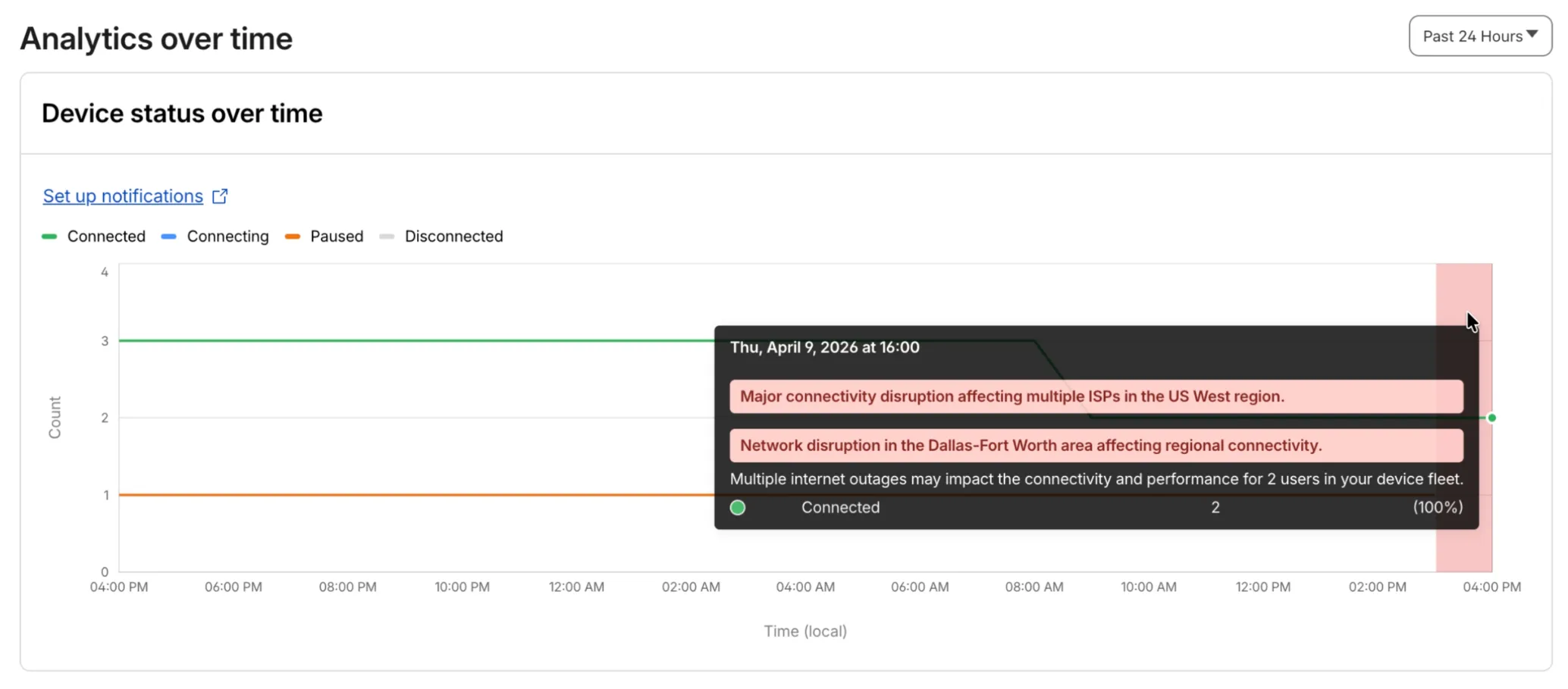
Digital Experience will display a dashboard notification when an Internet outage or traffic anomaly may impact a Cloudflare One Client device based on its geographic location or network connection.
This Internet outage and traffic anomaly data is pulled from Cloudflare Radar ↗. All Internet outage and traffic anomaly observations can be viewed in the Radar Outage Center ↗.

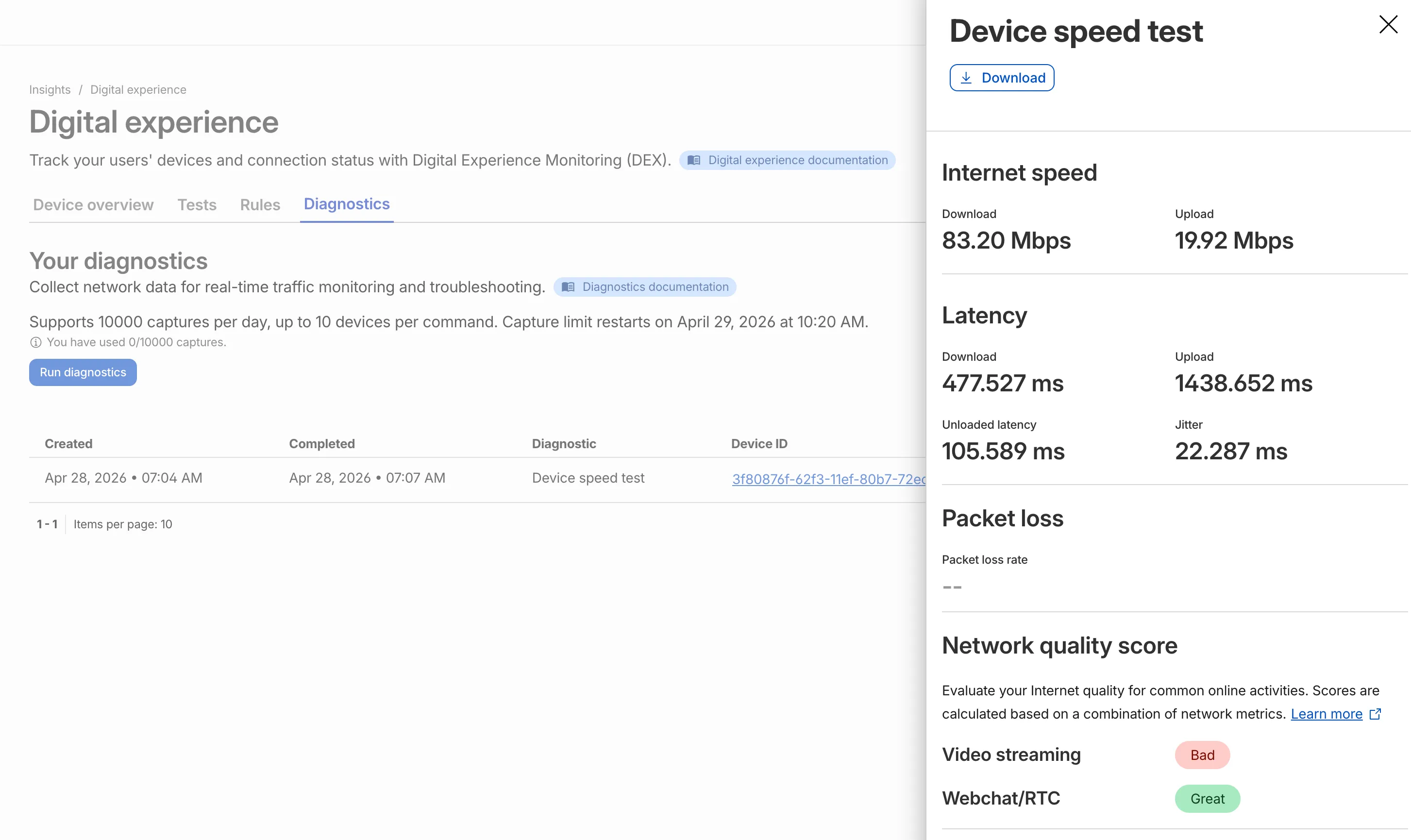
IT teams can now remotely run speed tests from the Cloudflare One Client to Cloudflare's network edge.
Each speed test includes the following metrics:
- Internet speed: download and upload throughput
- Latency: download, upload, unloaded latency, and jitter
- Network quality score: video streaming, webchat/real-time communication (RTC)
In the Cloudflare dashboard ↗, go to Zero Trust > Insights > Digital experience > Diagnostics and select Run diagnostics to use the feature today.
You can now create, view, and manage DLP detection entries outside of profiles.
Detection entries are no longer hidden inside individual profiles. Administrators can manage detection entries directly from the Detection entries section and use them in custom DLP profiles.
For more information, refer to Configure detection entries.
Cloudflare DLP now includes a new predefined profile designed to detect PII records that contain multiple types of personal data: Personally Identifiable Information (PII) Record.
Most predefined and custom DLP profiles match when any enabled detection entry matches. The Personally Identifiable Information (PII) Record profile is different. It only matches when at least three unique detection entries are found in close proximity, which reduces false positives from standalone values that may not represent a real PII record.
Detection entries included in the profile:
- AU Passport Number
- American Express Card Number
- Diners Club Card Number
- US Driver's License Number
- Email Address
- Full Name
- US Mailing Address
- Mastercard Card Number
- US Individual Tax Identification Number (ITIN)
- US Passport Number
- US Phone Number
- Union Pay Card Number
- United States SSN Numeric Detection
- Visa Card Number
For more information, refer to predefined DLP profiles.
You can now disable Cloudflare's reverse proxy across all zones in your account simultaneously using the new
enforce_dns_onlysetting. When enabled, Cloudflare responds to DNS queries for all proxied records with your origin IP addresses instead of Cloudflare's anycast IPs. This account-level kill switch is designed for incident response scenarios where you need to quickly route traffic directly to your origin servers.- Account-level — Affects all zones in the account simultaneously with a single API call.
- Non-destructive — Does not modify your DNS records. Disabling the setting restores normal proxy behavior.
- API-only — Available through the API only, not in the Cloudflare dashboard.
Included: Standard proxied A, AAAA, and CNAME records, Load Balancing records, and records matching Worker routes.
Excluded: Spectrum applications, Cloudflare Tunnel CNAMEs, R2 custom domains, Web3 gateways, and Workers custom domains continue to operate normally.
- Verify your origin servers can handle direct traffic without Cloudflare's caching and filtering.
- Review which origin IPs will become publicly visible through DNS queries.
- Test the API in a staging account before relying on it for incident response.
Available via API to all Cloudflare customers.
For information on how to use it, refer to Enforce DNS-only developer documentation .
Queues, Cloudflare's managed message queue, now exposes realtime backlog metrics via the dashboard, REST API, and JavaScript API. Three new fields are available:
backlog_count— the number of unacknowledged messages in the queuebacklog_bytes— the total size of those messages in bytesoldest_message_timestamp_ms— the timestamp of the oldest unacknowledged message
The following endpoints also now include a
metadata.metricsobject on the result field after successful message consumption:/accounts/{account_id}/queues/{queue_id}/messages/pull/accounts/{account_id}/queues/{queue_id}/messages/accounts/{account_id}/queues/{queue_id}/messages/batch
Call
env.QUEUE.metrics()to get realtime backlog metrics:TypeScript const {backlogCount, // numberbacklogBytes, // numberoldestMessageTimestamp, // Date | undefined} = await env.QUEUE.metrics();env.QUEUE.send()andenv.QUEUE.sendBatch()also now return a metrics object on the response.You can also query these fields via the GraphQL Analytics API or view realtime backlog on the dashboard ↗.
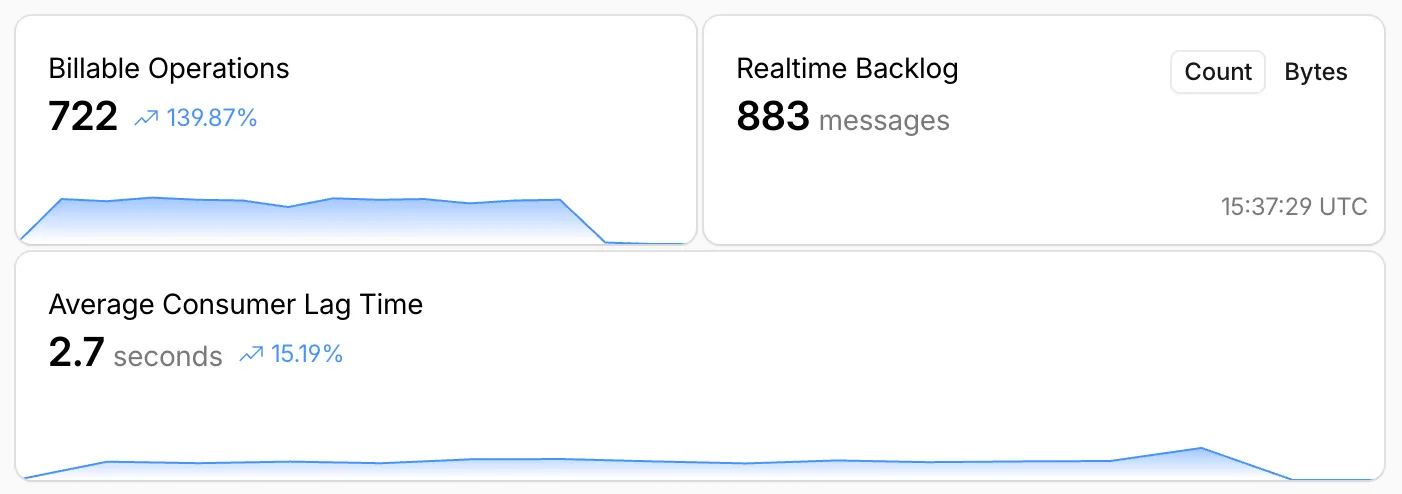
For more information, refer to Queues metrics.
-
The Support button in the dashboard global navigation header now takes you directly to the Cloudflare Support Portal ↗, eliminating the previous dropdown menu.
This change ensures that when you need help, you spend less time navigating the UI and more time getting the answers you need.
- Previous behavior: Selecting ? Support opened a dropdown menu with various links (Help Center, Cloudflare Community, etc.).
- New behavior: Selecting Support immediately redirects your current tab to the Support Portal.
To learn more about the resources available to you, refer to the Cloudflare Support documentation ↗.
Cache Response Rules now work with Version Management. You can version response-phase cache settings and promote them through environments, just like Cache Rules and other supported configurations.
Previously, Cache Response Rules were excluded from zone versioning. Any response-phase rule you created applied globally across all environments with no way to test changes in staging first. Cache Rules already supported versioning, but the response phase, where you modify
Cache-Controldirectives, manage cache tags, and strip headers, did not.Cache Response Rules are now fully integrated with Version Management. You can create or modify response-phase rules within a version, and those changes stay scoped to that version until promoted.
- Safe rollout of cache behavior changes: Test response-phase rules in a staging environment before promoting to production. Catch unintended caching side effects early.
- Parity with Cache Rules: Cache Response Rules now follow the same versioning workflow as Cache Rules, so you can manage all cache configuration through a single promotion pipeline.
- Independent environment control: Run different response-phase cache settings per environment. For example, strip
Set-Cookieheaders in staging to validate cacheability without affecting production traffic.
Configure Cache Response Rules in the Cloudflare dashboard ↗ under Caching > Cache Rules, or via the Rulesets API. For more details, refer to the Cache Response Rules documentation and the Version Management documentation.
Cloudflare-generated 5xx error responses now return structured JSON and Markdown when agents request them, matching the format already available for 1xxx errors. Responses follow RFC 9457 (Problem Details for HTTP APIs) ↗ and include a
Retry-AfterHTTP header on retryable codes.5xx coverage. Ten Cloudflare-generated error codes (500, 502, 504, 520-526) now serve structured responses. These are errors Cloudflare itself generates when it cannot reach or understand the origin server. Origin-generated 5xx responses that Cloudflare passes through are not affected.
Fault attribution. The
error_categoryfield tells agents where the fault lies:origin(502, 504, 520-524) — the origin server is responsible. Transient; retry with the backoff inretry_after.cloudflare(500) — Cloudflare's fault, not the website or the request. Short retry.ssl(525, 526) — the origin's TLS configuration is broken. Do not retry.
Retry-After header. Retryable codes (500, 502, 504, 520-524) include a
Retry-AfterHTTP header matching theretry_afterbody field. Non-retryable codes (525, 526) do not include the header.Request header sent Response format Accept: application/jsonJSON ( application/jsoncontent type)Accept: application/problem+jsonJSON ( application/problem+jsoncontent type)Accept: application/json, text/markdown;q=0.9JSON Accept: text/markdownMarkdown Accept: text/markdown, application/jsonMarkdown (equal q, first-listed wins)Accept: */*HTML (default) Available now for all zones on all plans.
Get JSON response for error 522:
Terminal window curl -s --compressed -H "Accept: application/json" -A "TestAgent/1.0" -H "Accept-Encoding: gzip, deflate" "<YOUR_DOMAIN>/cdn-cgi/error/522" | jq .Check presence of the
Retry-AfterHTTP header associated with the JSON response for error 521:Terminal window curl -s --compressed -D - -o /dev/null -H "Accept: application/json" -A "TestAgent/1.0" -H "Accept-Encoding: gzip, deflate" "<YOUR_DOMAIN>/cdn-cgi/error/521" | grep -i retry-afterReferences:
Resource Tagging is now in public beta and rolling out to all Cloudflare accounts over the coming days. You can attach custom key-value metadata to your Cloudflare resources and query across your entire account to find what you need.
- Broad resource type support — Tag zones, custom hostnames, Cloudflare Tunnels, Workers, D1 databases, R2 buckets, KV namespaces, Durable Object namespaces, Queues, Stream videos, Images, Access applications, Gateway rules, AI Gateways, and more. Refer to the full list of supported resource types.
- Powerful filtering — Query tagged resources using AND/OR logic, negation, and key-only matching. Combine up to 20 filters per query to build precise resource views.
- Account and zone-level endpoints — Full CRUD operations across both scopes.
- Token-based authentication — Tagging supports Account Owned Tokens that persist independently of individual users, so your automation keeps running through credential rotations and team changes.
- Flexible role support — Super Administrators, Workers Admins, and Tag Admins can all manage tags.
The API is the primary interface for Resource Tagging and the recommended path for all workflows — scripting tag assignments, building CI/CD pipelines, or integrating with your infrastructure-as-code toolchain.
You can also view and manage tagged resources directly in the Cloudflare dashboard. Navigate to Manage Account > Resource Tagging to see all tagged resources across your account, filter by resource name or tag, and add or edit tags inline.
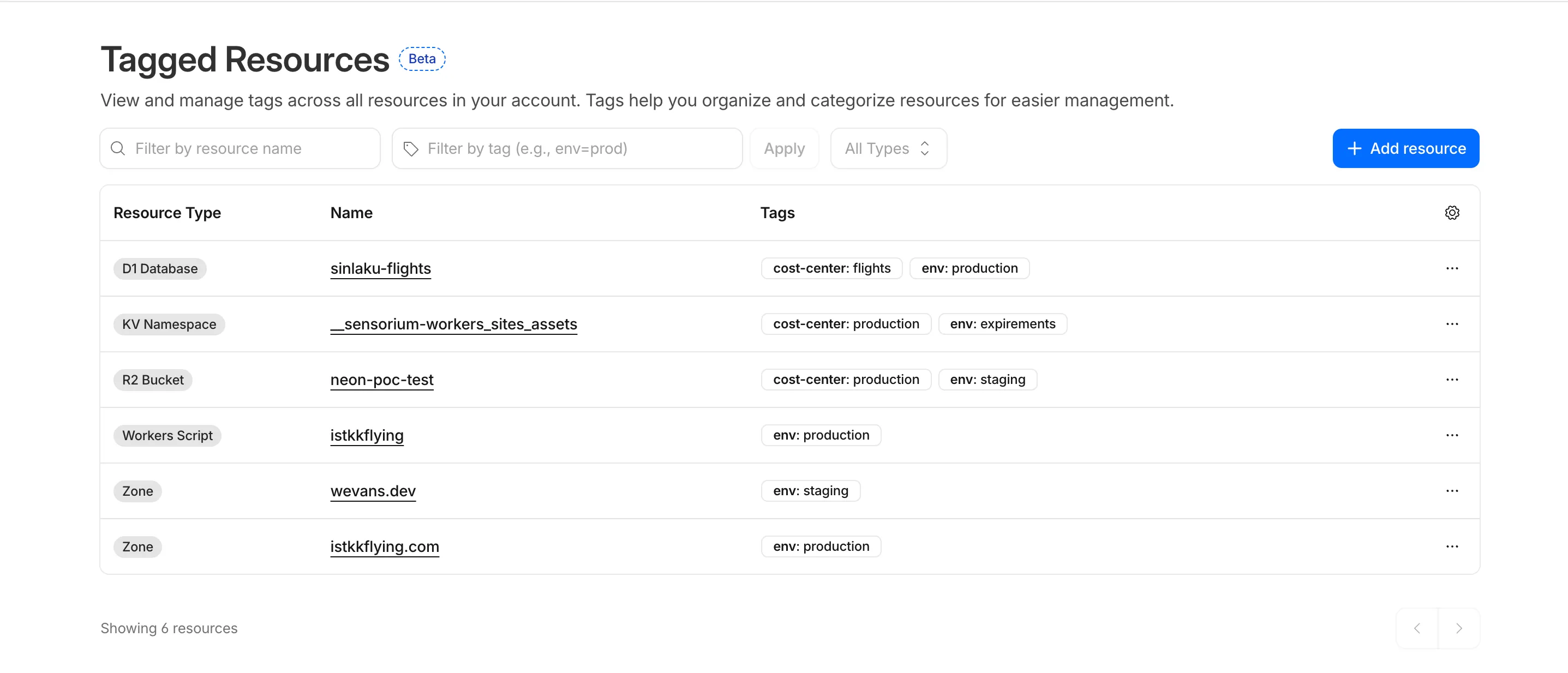
In future releases, expect support for additional resource types across the Cloudflare platform, tag-based access control policies for scoping user permissions to tagged resources, billing and usage attribution by tag for breaking down costs by team, project, or environment, and Terraform provider support for managing tags declaratively.
PUTreplaces all tags on a resource (no partial update). Use the GET, merge, PUT workflow to modify individual tags safely.DELETEremoves all tags from a resource. To remove a single tag, PUT the remaining tags back.- Querying tags for a resource that has never been tagged returns
500instead of404. This is a known beta limitation.
To get started, refer to the Resource Tagging documentation.
We have introduced a unified investigation workspace within Brand Protection to help analysts manage complex brand portfolios. Instead of jumping between individual queries, you can now consolidate your workflow into a single, cohesive view.
- You can now elect multiple saved queries from your dashboard to generate a consolidated "Combined Matches" view. This allows you to triage results from different brand queries in one unified table
- You can open query extended views in distinct tabs within the Brand Protection dashboard. This enables you to maintain multiple investigation contexts simultaneously and switch between them without losing your place.
- You can reset your workspace using the new "Clear Selection" action, making it easier to pivot between different investigation sets.
- Eliminate fragmented workflows by viewing all matches across different query buckets in a single table, reducing the need to click through dozens of individual query pages
- Correlate related campaigns by seeing similar domains or infrastructure patterns that appear across multiple saved queries
Learn more in our Brand Protection documentation.
This week's release focuses on new improvements to enhance coverage.
Key Findings
- Existing rule enhancements have been deployed to improve detection resilience against broad classes of web attacks and strengthen behavioral coverage.
Continuous Rule Improvements
We are continuously refining our managed rules to provide more resilient protection and deeper insights into attack patterns. To ensure an optimal security posture, we recommend consistently monitoring the Security Events dashboard and adjusting rule actions as these enhancements are deployed.
Ruleset Rule ID Legacy Rule ID Description Previous Action New Action Comments Cloudflare Managed Ruleset N/A PostgreSQL - SQLi - COPY - Beta Log Block This is a new detection. This rule is merged into the original rule "PostgreSQL - SQLi - COPY - Body (ID:
Cloudflare Managed Ruleset N/A PostgreSQL - SQLi - COPY - Headers Log Block This is a new detection. Cloudflare Managed Ruleset N/A PostgreSQL - SQLi - COPY - URI Log Block This is a new detection. Cloudflare Managed Ruleset N/A SQLi - AND/OR MAKE_SET/ELT - Beta Log Block This is a new detection. This rule is merged into the original rule "SQLi - AND/OR MAKE_SET/ELT - Body" (ID:
Cloudflare Managed Ruleset N/A SQLi - AND/OR MAKE_SET/ELT - Headers Log Block This is a new detection. Cloudflare Managed Ruleset N/A SQLi - AND/OR MAKE_SET/ELT - URI Log Block This is a new detection. Cloudflare Managed Ruleset N/A SQLi - Common Patterns - Beta Log Block This is a new detection. This rule is merged into the original rule "SQLi - Common Patterns - Body" (ID:
Cloudflare Managed Ruleset N/A SQLi - Common Patterns - Headers Log Block This is a new detection. Cloudflare Managed Ruleset N/A SQLi - Common Patterns - URI Log Block This is a new detection. Cloudflare Managed Ruleset N/A SQLi - Equation - Beta Log Block This is a new detection. This rule is merged into the original rule "SQLi - Equation - Body" (ID:
Cloudflare Managed Ruleset N/A SQLi - Equation - Headers Log Block This is a new detection. Cloudflare Managed Ruleset N/A SQLi - Equation - URI Log Block This is a new detection. Cloudflare Managed Ruleset N/A SQLi - AND/OR Digit Operator Digit - Beta Log Block This is a new detection. This rule is merged into the original rule "SQLi - AND/OR Digit Operator Digit - Body" (ID:
Cloudflare Managed Ruleset N/A SQLi - AND/OR Digit Operator Digit - Headers Log Block This is a new detection. Cloudflare Managed Ruleset N/A SQLi - AND/OR Digit Operator Digit - URI Log Block This is a new detection. Cloudflare Managed Ruleset N/A SQLi - Benchmark Function - Beta Log Block This is a new detection. This rule is merged into the original rule "SQLi - Benchmark Function - Body" (ID:
Cloudflare Managed Ruleset N/A SQLi - Benchmark Function - Headers Log Block This is a new detection. Cloudflare Managed Ruleset N/A SQLi - Benchmark Function - URI Log Block This is a new detection. Cloudflare Managed Ruleset N/A SQLi - Comparison - Beta Log Block This is a new detection. This rule is merged into the original rule "SQLi - Comparison - Body" (ID:
Cloudflare Managed Ruleset N/A SQLi - Comparison - Headers Log Block This is a new detection. Cloudflare Managed Ruleset N/A SQLi - Comparison - URI Log Block This is a new detection. Cloudflare Managed Ruleset N/A SQLi - String Concatenation - Body - Beta Log Block This is a new detection. This rule is merged into the original rule "SQLi - String Concatenation - Headers" (ID: Cloudflare Managed Ruleset N/A SQLi - String Concatenation - Headers Log Block This is a new detection.(Former Id was Cloudflare Managed Ruleset N/A SQLi - String Concatenation - URI Log Block This is a new detection. (Former Id was Cloudflare Managed Ruleset N/A SQLi - SELECT Expression - Beta Log Block This is a new detection. This rule is merged into the original rule "SQLi - SELECT Expression - Body" (ID:
Cloudflare Managed Ruleset N/A SQLi - SELECT Expression - Headers Log Block This is a new detection. Cloudflare Managed Ruleset N/A SQLi - SELECT Expression - URI Log Block This is a new detection. Cloudflare Managed Ruleset N/A SQLi - ORD and ASCII - Beta Log Block This is a new detection. This rule is merged into the original rule "SQLi - ORD and ASCII- Body" (ID:
Cloudflare Managed Ruleset N/A SQLi - ORD and ASCII - URI Log Block This is a new detection. Cloudflare Managed Ruleset N/A SQLi - ORD and ASCII - Headers Log Block This is a new detection. Cloudflare Managed Ruleset N/A SQLi - Destructive Operations Log Block This is a new detection.
Zero Trust Network Session Logs are now generated for all traffic proxied through Cloudflare Gateway, regardless of on-ramp type. This includes traffic from proxy endpoints (PAC files) and Browser Isolation egress — on-ramps that previously did not generate session logs.
Customers who already consume the
zero_trust_network_sessionsdataset via Logpush or Log Explorer may see increased log volume if they use these on-ramps.For field definitions, refer to Zero Trust Network Session Logs. For traffic analysis, refer to Network session analytics.
Terraform Provider v5.19.0 introduces 14 new resources spanning AI Gateway, Pipelines, R2 Data Catalog, User Groups, Vulnerability Scanner, Workers Observability, and Zero Trust capabilities. This release significantly improves the v4 to v5 migration experience with automatic state upgraders for 26 resources, working seamlessly with the new tf-migrate CLI tool ↗ to automate resource renames, attribute updates, and
movedblock generation. Together, these enhancements reduce manual migration effort and minimize risk when upgrading from v4 to v5.Note:
cmd/migrateis deprecated in favor oftf-migrateand will be removed in a future release (#7062 ↗)- cloudflare_ai_gateway: Manage AI Gateway instances
- cloudflare_certificate_authorities_hostname_associations: Manage mTLS certificate hostname associations
- cloudflare_custom_page_asset: Manage custom page assets
- cloudflare_pipeline: Manage Cloudflare Pipelines
- cloudflare_r2_data_catalog: Manage R2 Data Catalog
- cloudflare_user_group: Manage user groups
- cloudflare_user_group_members: Manage user group memberships
- cloudflare_vulnerability_scanner_credential: Manage vulnerability scanner credentials
- cloudflare_vulnerability_scanner_credential_set: Manage vulnerability scanner credential sets
- cloudflare_vulnerability_scanner_target_environment: Manage vulnerability scanner target environments
- cloudflare_workers_observability_destination: Manage Workers Observability destinations
- cloudflare_zero_trust_device_ip_profile: Manage Zero Trust device IP profiles
- cloudflare_zero_trust_device_subnet: Manage Zero Trust device subnets
- cloudflare_zero_trust_dlp_settings: Manage Zero Trust DLP settings
State upgraders added for seamless migration from v4 to v5 for the following resources:
- account
- account_member
- account_token
- authenticated_origin_pulls
- authenticated_origin_pulls_hostname_certificate
- byo_ip_prefix
- custom_hostname
- custom_ssl
- leaked_credential_check
- leaked_credential_check_rule
- logpush_ownership_challenge
- mtls_certificate
- observatory_scheduled_test
- pages_domain
- regional_tiered_cache
- turnstile_widget
- workers_custom_domain
- zero_trust_device_custom_profile
- zero_trust_device_default_profile
- zero_trust_device_posture_integration
- zero_trust_gateway_certificate
- zero_trust_gateway_settings
- zero_trust_organization
- zero_trust_tunnel_cloudflared_virtual_network
- zone_setting
- ruleset: Add
content_converterandredirects_for_ai_trainingsupport to configuration rules - zero_trust_gateway_logging: Make importable
- account_member: Add UseStateForUnknown to status field to prevent drift
- authenticated_origin_pulls_settings: Fix no prior schema and no-op upgrade
- certificate_pack: Initialize empty lists instead of null in state upgrader to prevent drift
- migrations: Handle ambiguous schema_version state for v4/v5 coexistence
- zero_trust_access_policy: Fix nil pointer panic in state upgrader; set PriorSchema nil for v4 state upgrade
- ai_search_instance: Restore original defaults for cache and cache_threshold; conflict resolution
- apijson: Return empty object from MarshalForPatch when no fields are serializable
- dlp_predefined_profile: Eliminate perpetual entries and enabled_entries drift
- dns_record: Avoid unnecessary drift for ipv4_only and ipv6_only attributes; remove private_routing default value
- drift: Preserve prior state values for optional fields not returned by API
- healthcheck: Use buildHealthcheckPlanChecks helper for correct plan checks per migration source; update assertions
- leaked_credential_check_rule: Handle empty ID from v4 provider state migration
- list_item: Remove context
- logpush_job: Update model for migration
- ruleset: Fix migration; add redirects_for_ai_training to SourceV4ActionParametersModel; fix duplicate model attribute
- worker: Add UseStateForUnknown() plan modifiers and update tests for observability.traces
- workers_custom_domain: Handle HTTP 200 no content header; update assertions
- workers_script: Fix model drift
- zero_trust_access_identity_provider: Fix boolean drifts
- zero_trust_device_managed_networks: Upgrade resource state
- zero_trust_gateway_policy: Make filters Computed+Optional to prevent drift
- zero_trust_gateway_settings: Fix breaking changes; implement sweeper to reset account to clean defaults
- zone_setting: Migration test improvements and fixes
- healthcheck: Update port description to clarify defaults
- Add application-scoped access policy migration guidance
- Update zone_settings_override migration guide for tf-migrate v2 workflow
We're excited to announce tf-migrate, a purpose-built CLI tool that simplifies migrating from Cloudflare Terraform Provider v4 to v5.
Terraform Provider v5 is stable and actively receiving updates. We encourage all users to migrate to v5 to take advantage of ongoing enhancements and new capabilities.
Cloudflare uses tf-migrate to migrate our own infrastructure — the same tool we're providing to the community — ensuring the best possible migration experience.
tf-migrate automates the tedious and error-prone parts of the v4 to v5 migration process:
- Resource type renames – Automatically updates
cloudflare_record→cloudflare_dns_record,cloudflare_access_application→cloudflare_zero_trust_access_application, and 40+ other renamed resources - Attribute transformations – Updates field names (e.g.,
value→contentfor DNS records) and restructures nested blocks - Moved block generation – Creates Terraform 1.8+
movedblocks to prevent resource replacements and ensure zero-downtime migrations - Cross-file reference updates – Automatically finds and updates all references to renamed resources across your entire configuration
- Dry-run mode – Preview all changes before applying them to ensure safety
Combined with the automatic state upgraders introduced in v5.19+, tf-migrate eliminates the manual work and risk that previously made v5 migrations challenging. Tf-migrate operates directly on the config, and the built-in state upgraders handle the rest.
Tf-migrate currently supports the most common Terraform resources our customers use. We are actively working to expand coverage, with the most commonly used resources prioritized first.
For the complete list of supported resources and their migration status, refer to the v5 Stabilization Tracker ↗. This list is updated regularly as additional resources are stabilized and migration support is added.
Resources not yet supported by tf-migrate will need to be migrated manually using the version 5 upgrade guide ↗. The upgrade guide provides step-by-step instructions for handling resource renames, attribute changes, and state migrations.
- Download tf-migrate ↗
- Version 5 Migration Guide ↗
- Terraform Provider documentation ↗
- v5 Stabilization Tracker ↗
We have been releasing Betas over the past month and a half while testing this tool. See the full changelog of those Betas here: tf-migrate releases ↗.
- Resource type renames – Automatically updates
Independent MFA in Cloudflare Access now supports two additional organization-level controls:
- Restrict authenticators by AAGUID — Limit enrollment to a specific set of WebAuthn authenticators using their AAGUID ↗. This is useful for organizations that require FIPS-validated security keys or company-issued hardware. AAGUIDs are managed through a new List type.
- AMR matching — Skip the independent MFA prompt when the identity provider has already performed an equivalent MFA. Access reads the
amrclaim defined in RFC 8176 ↗ and matches supported values such ashwk,otp, andfptto the authenticator types allowed on the application or policy. This prevents users from having to complete MFA twice when their identity provider already enforces it.
To get started, refer to Independent MFA.
Audit Logs v2 now supports organization-level audit logs. Org Admins can retrieve audit events for actions performed at the organization level via the Audit Logs v2 API.
To retrieve organization-level audit logs, use the following endpoint:
Terminal window GET https://api.cloudflare.com/client/v4/organizations/{organization_id}/logs/auditThis release covers user-initiated actions performed through organization-level APIs. Audit logs for system-initiated actions, a dashboard UI, and Logpush support for organizations will be added in future releases.
For more information, refer to the Audit Logs documentation.
-
In this release, you'll see a number of breaking changes. This is primarily due to changes in OpenAPI definitions, which our libraries are based off of, and codegen updates that we rely on to read those OpenAPI definitions and produce our SDK libraries.
Please ensure you read through the list of changes below before moving to this version - this will help you understand any down or upstream issues it may cause to your environments.
See the v6.10.0 Migration Guide ↗ for before/after code examples and actions needed for each change.
Several fields have been removed from
AbuseReportNewParamsBodyAbuseReportsRegistrarWhoisReportRegWhoRequest:RegWhoGoodFaithAffirmationRegWhoLawfulProcessingAgreementRegWhoLegalBasisRegWhoRequestTypeRegWhoRequestedDataElements
The
InstanceNewParamsandInstanceUpdateParamstypes have been significantly restructured. Many fields have been moved or removed:InstanceNewParams.TokenID,Type,CreatedFromAISearchWizard,WorkerDomainremovedInstanceUpdateParams— most configuration fields removed (includingIndexMethod,IndexingOptions,MaxNumResults,Metadata,Paused,PublicEndpointParams,Reranking,RerankingModel,RetrievalOptions,RewriteModel,RewriteQuery,ScoreThreshold,SourceParams,Summarization,SummarizationModel,SystemPromptAISearch,SystemPromptIndexSummarization,SystemPromptRewriteQuery,TokenID,CreatedFromAISearchWizard,WorkerDomain)InstanceSearchParams.Messagesfield removed along withInstanceSearchParamsMessageandInstanceSearchParamsMessagesRoletypes
The
InstanceItemServicetype has been removed. The items sub-resource atclient.AISearch.Instances.Itemsno longer exists in the non-namespace path. Useclient.AISearch.Namespaces.Instances.Itemsinstead.The following types have been removed from the
ai_searchpackage:TokenDeleteResponseTokenListParams(and associatedTokenListParamsOrderBy,TokenListParamsOrderByDirection)
The
Investigate.Move.New()method now returns a raw slice instead of a paginated wrapper:New()returns*[]InvestigateMoveNewResponseinstead of*pagination.SinglePage[InvestigateMoveNewResponse]NewAutoPaging()method removed
The
ConfigEditParamstype lost itsMTLSandNamefields. TheHyperdriveMTLSParamtype lostMTLSandHostfields. TheHostfield on origin config changed fromparam.Field[string]to a plainstring.The
UserGroupMemberNewParamsstruct has been restructured and theNew()method now returns a paginated response:UserGroupMemberNewParams.Bodyrenamed toUserGroupMemberNewParams.MembersUserGroupMemberNewParamsBodyrenamed toUserGroupMemberNewParamsMemberUserGroupMemberUpdateParams.Bodyrenamed toUserGroupMemberUpdateParams.MembersUserGroupMemberUpdateParamsBodyrenamed toUserGroupMemberUpdateParamsMemberUserGroups.Members.New()returns*pagination.SinglePage[UserGroupMemberNewResponse]instead of*UserGroupMemberNewResponse
The
UserGroupListParams.Directionfield changed fromparam.Field[string]toparam.Field[UserGroupListParamsDirection](typed enum withasc/descvalues).Several delete methods across Pipelines now return typed responses instead of bare error:
Pipelines.DeleteV1()returns(*PipelineDeleteV1Response, error)instead oferrorPipelines.Sinks.Delete()returns(*SinkDeleteResponse, error)instead oferrorPipelines.Streams.Delete()returns(*StreamDeleteResponse, error)instead oferror
The following response envelope types have been removed:
MessageBulkPushResponseSuccessMessagePushResponseSuccessMessageAckResponsefieldsRetryCountandWarningsremoved
Methods now return direct types instead of
SinglePagewrappers, and several internal types have been removed. AssociatedAutoPagingmethods have also been removed:Stores.New()returns*StoreNewResponseinstead of*pagination.SinglePage[StoreNewResponse]Stores.NewAutoPaging()method removedStores.Secrets.BulkDelete()returns*StoreSecretBulkDeleteResponseinstead of*pagination.SinglePage[StoreSecretBulkDeleteResponse]Stores.Secrets.BulkDeleteAutoPaging()method removed- Removed types:
StoreDeleteResponse,StoreDeleteResponseEnvelopeResultInfo,StoreSecretDeleteResponse,StoreSecretDeleteResponseStatus,StoreSecretBulkDeleteResponse(old shape),StoreSecretBulkDeleteResponseStatus,StoreSecretDeleteResponseEnvelopeResultInfo StoreNewParamsrestructured (oldStoreNewParamsBodyremoved)StoreSecretBulkDeleteParamsrestructured
The
AudioTracks.Get()method now returns a dedicated response type instead of a paginated list. TheGetAutoPaging()method has been removed:Get()returns*AudioTrackGetResponseinstead of*pagination.SinglePage[Audio]GetAutoPaging()method removed
The
Clip.New()method now returns the sharedVideotype. The following types have been entirely removed:Clip,ClipPlayback,ClipStatus,ClipWatermark
ClipNewParams.MaxDurationSeconds,ThumbnailTimestampPct,WatermarkremovedCopyNewParams.ThumbnailTimestampPct,Watermarkremoved
DownloadNewResponseStatustype removedWebhookUpdateResponseandWebhookGetResponsechanged frominterface{}type aliases to full struct types
The following union interface types have been removed:
AccessAIControlMcpPortalListResponseServersUpdatedPromptsUnionAccessAIControlMcpPortalListResponseServersUpdatedToolsUnionAccessAIControlMcpPortalReadResponseServersUpdatedPromptsUnionAccessAIControlMcpPortalReadResponseServersUpdatedToolsUnion
NEW SERVICE: Full vulnerability scanning management
- CredentialSets - CRUD for credential sets (
New,Update,List,Delete,Edit,Get) - Credentials - Manage credentials within sets (
New,Update,List,Delete,Edit,Get) - Scans - Create and manage vulnerability scans (
New,List,Get) - TargetEnvironments - Manage scan target environments (
New,Update,List,Delete,Edit,Get)
NEW SERVICE: Namespace-scoped AI Search management
New(),Update(),List(),Delete(),ChatCompletions(),Read(),Search()- Instances - Namespace-scoped instances (
New,Update,List,Delete,ChatCompletions,Read,Search,Stats) - Jobs - Instance job management (
New,Update,List,Get,Logs) - Items - Instance item management (
List,Delete,Chunks,NewOrUpdate,Download,Get,Logs,Sync,Upload)
NEW SERVICE: DevTools protocol browser control
- Session - List and get devtools sessions
- Browser - Browser lifecycle management (
New,Delete,Connect,Launch,Protocol,Version) - Page - Get page by target ID
- Targets - Manage browser targets (
New,List,Activate,Get)
NEW: Domain check and search endpoints
Check()-POST /accounts/{account_id}/registrar/domain-checkSearch()-GET /accounts/{account_id}/registrar/domain-search
NEW: Registration management (
client.Registrar.Registrations)New(),List(),Edit(),Get()RegistrationStatus.Get()- Get registration workflow statusUpdateStatus.Get()- Get update workflow status
NEW SERVICE: Manage origin cloud region configurations
New(),List(),Delete(),BulkDelete(),BulkEdit(),Edit(),Get(),SupportedRegions()
NEW SERVICE: DLP settings management
Update(),Delete(),Edit(),Get()
AgentReadiness.Summary()- Agent readiness summary by dimensionAI.MarkdownForAgents.Summary()- Markdown-for-agents summaryAI.MarkdownForAgents.Timeseries()- Markdown-for-agents timeseries
UserGroups.Members.Get()- Get details of a specific member in a user groupUserGroups.Members.NewAutoPaging()- Auto-paging variant for adding membersUserGroups.NewParams.Policieschanged from required to optional
ContentBotsProtectionfield added toBotFightModeConfigurationandSubscriptionConfiguration(block/disabled)
None in this release.
Custom Dashboards are now available to all Cloudflare customers. Build personalized views that highlight the metrics most critical to your infrastructure and security posture, moving beyond standard product dashboards.
This update significantly expands the data available for visualization. Build charts based on any of the 100+ datasets available via the Cloudflare GraphQL API, covering everything from WAF events and Workers metrics to Load Balancing and Zero Trust logs.
For Log Explorer customers, you can now turn raw log queries directly into dashboard charts. When you identify a specific pattern or spike while investigating logs, save that query as a visualization to monitor those signals in real-time without leaving the dashboard.
- Unified visibility: Consolidate signals from different Cloudflare products (for example, HTTP Traffic and R2 Storage) into a single view.
- Flexible monitoring: Create charts that focus on specific status codes, ASN regions, or security actions that matter to your business.
- Expanded limits: Log Explorer customers can create up to 100 dashboards (up from 25 for standard customers).
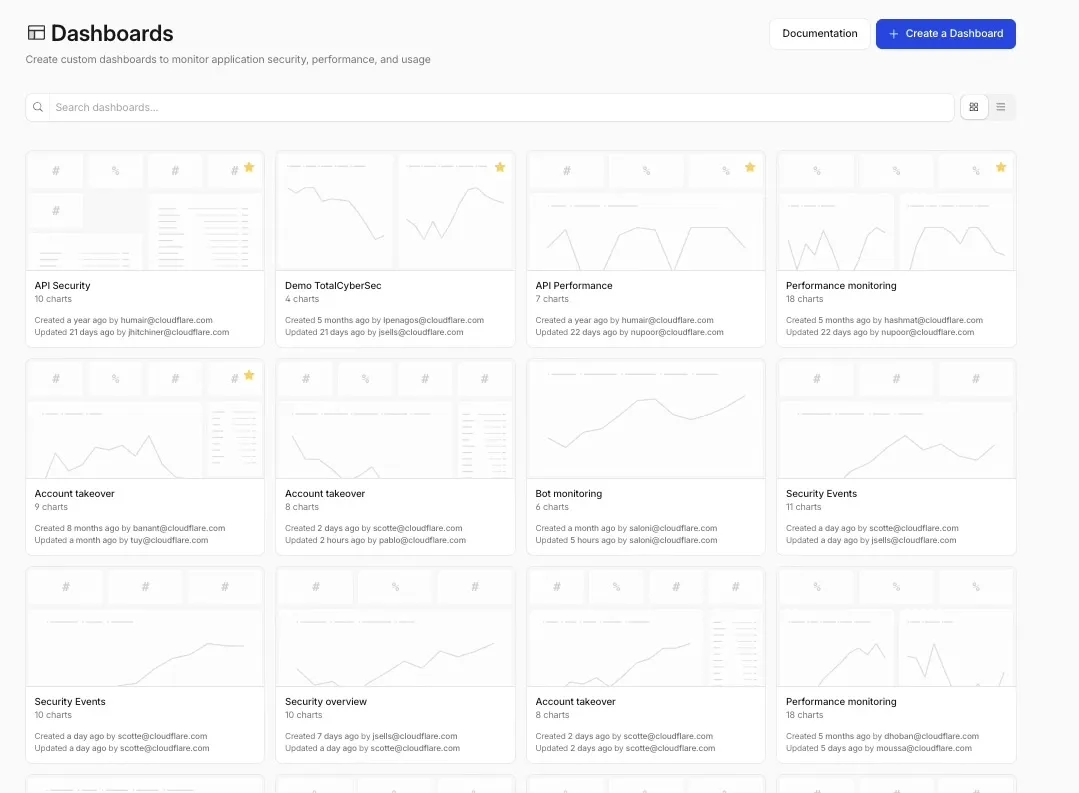
To get started, refer to the Custom Dashboards documentation.
R2 Data Catalog, a managed Apache Iceberg ↗ catalog built into R2, now removes unreferenced data files during automatic snapshot expiration. This improvement reduces storage costs and eliminates the need to run manual maintenance jobs to reclaim space from deleted data.
Previously, snapshot expiration only cleaned up Iceberg metadata files such as manifests and manifest lists. Data files that were no longer referenced by active snapshots remained in R2 storage until you manually ran
remove_orphan_filesorexpire_snapshotsthrough an engine like Spark. This required extra operational overhead and left stale data files consuming storage.Snapshot expiration now handles both metadata and data file cleanup automatically. When a snapshot is expired, any data files that are no longer referenced by retained snapshots are removed from R2 storage.
Terminal window # Enable catalog-level snapshot expirationnpx wrangler r2 bucket catalog snapshot-expiration enable my-bucket \--older-than-days 7 \--retain-last 10To learn more about snapshot expiration and other automatic maintenance operations, refer to the table maintenance documentation.
Cloudflare Advanced Network Firewall Country rules are now supported for accounts using Unified Routing mode. This feature requires a Cloudflare Advanced Network Firewall subscription.
You can create firewall rules that match traffic based on source or destination country to enforce geographic access policies across your network.
This is the first of the Cloudflare Advanced Network Firewall features to become available in Unified Routing. Support for additional features - IP Lists, ASN Lists, Threat Intel Lists, IDS, Rate Limiting, SIP, and Managed Rulesets - is planned.
For the full list of current beta limitations, refer to Traffic steering beta limitations.
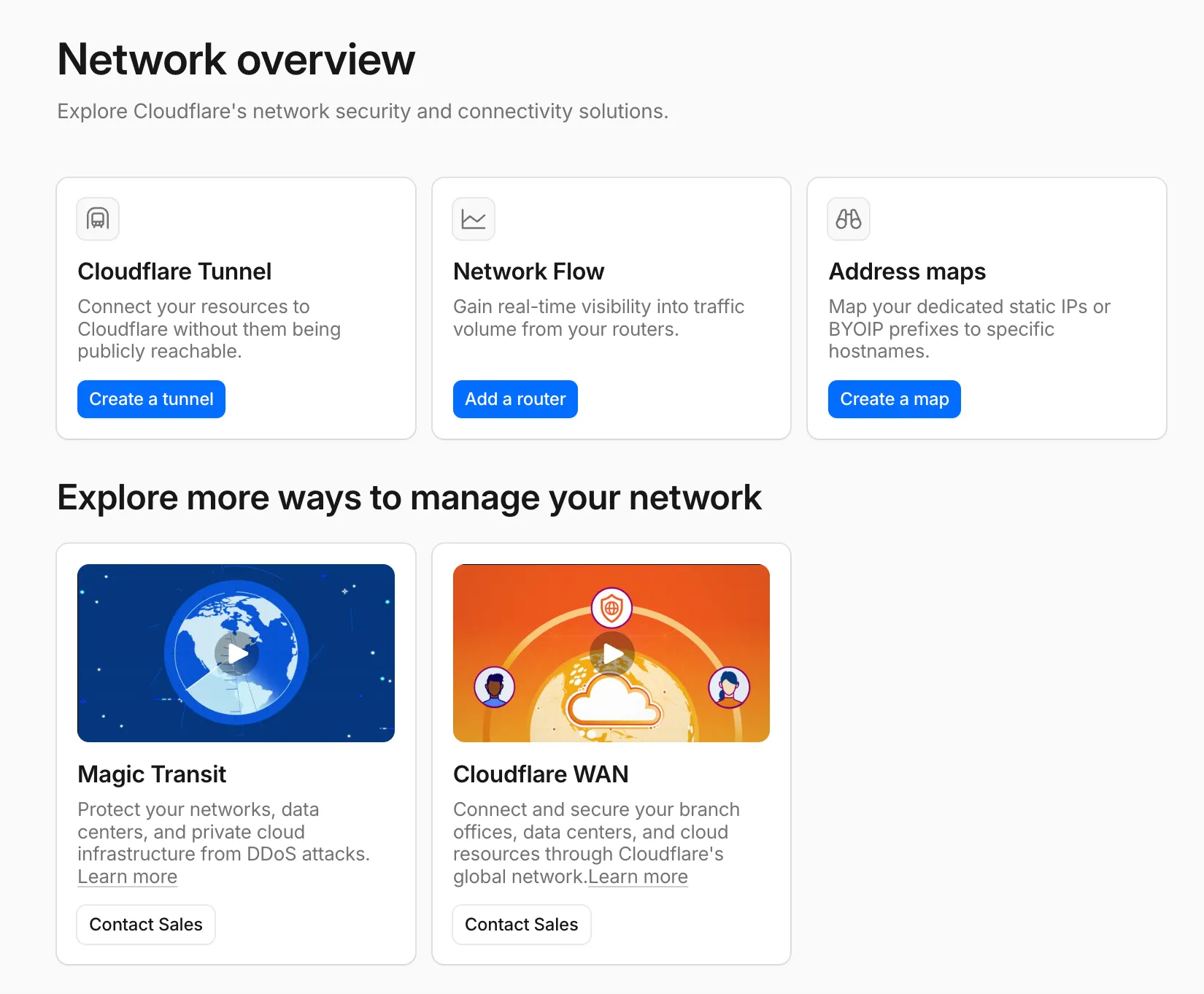
A new Network Overview page in the Cloudflare dashboard gives you a single starting point for network security and connectivity products.
From the Network Overview page, you can:
- Connect resources with Cloudflare Tunnel - Create tunnels to connect your infrastructure to Cloudflare without exposing it to the public Internet.
- Monitor traffic with Network Flow - Get real-time visibility into traffic volume from your routers.
- Configure Address Maps - Map dedicated static IPs or BYOIP prefixes to specific hostnames.
- Explore Magic Transit and Cloudflare WAN - Set up DDoS protection for your networks and connectivity for your branch offices and data centers.
To find it, go to Networking ↗ in the dashboard sidebar.
If you already use Magic Transit, Cloudflare WAN, or other Cloudflare network services products, your existing experience is unchanged.