This emergency release introduces a new rule to detect Next.js App Router middleware and proxy bypass attempts via segment-prefetch routes (CVE-2026-44575).
Key Findings
CVE-2026-44575: Next.js Middleware / Proxy Bypass in App Router Applications via Segment-Prefetch Routes
Successful exploitation allows unauthenticated attackers to bypass middleware or proxy-based authorization checks in affected Next.js App Router applications. This leads to unauthorized access to protected content, potential exposure of sensitive application data, and compromise of application security boundaries.
We strongly recommend upgrading to Next.js 15.5.16 or 16.2.5 (or later) immediately to address the underlying vulnerability. If you cannot upgrade immediately, enforce authorization in the underlying route or page logic instead of relying solely on middleware.
Ruleset Rule ID Legacy Rule ID Description Previous Action New Action Comments Cloudflare Managed Ruleset N/A Next.js - Middleware Bypass via Invalid RSC Header - CVE:CVE-2026-44575 N/A Disabled This is a new detection.
You can now get a single unified trace across Worker-to-Worker subrequests, with trace context propagating automatically. Previously, automatic tracing produced disconnected traces when a Worker called another Worker through a service binding or Durable Object.
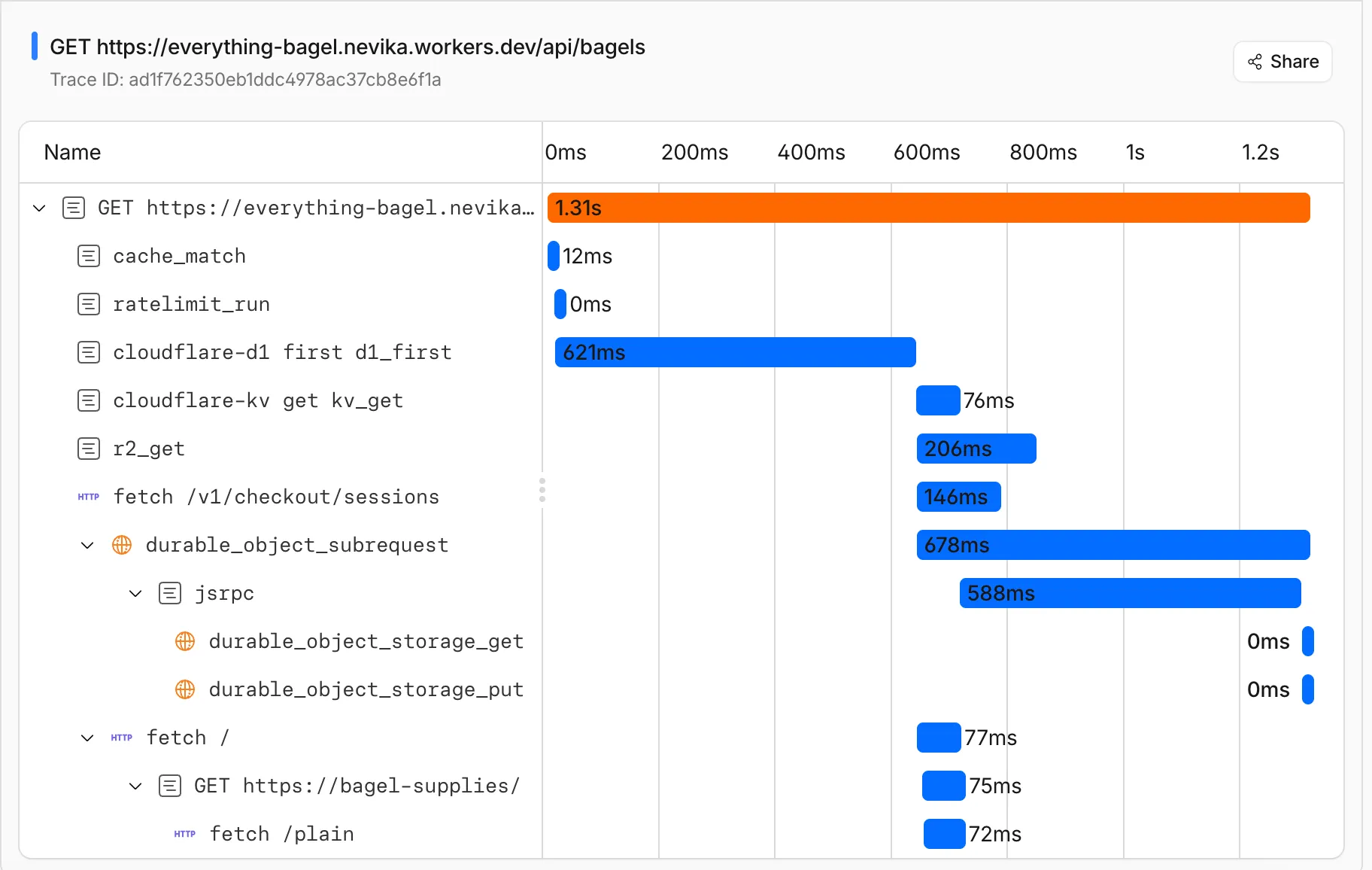
This means you can:
- Follow a request through your entire Worker architecture in one trace view
- See service binding and Durable Object calls as nested child spans instead of separate traces
- Debug cross-Worker request flows in the Cloudflare dashboard or in an external observability platform via OpenTelemetry
Tracing must be enabled in your Wrangler configuration for traces to be recorded. Checkout Workers tracing to get started.
Up next, we are working on external trace context propagation using W3C Trace Context standards ↗, which will allow traces from your Workers to link with traces from services outside of Cloudflare.
PhishNet users can now access Cloudy summaries directly within the email investigation experience. When reviewing a message in PhishNet, users will see an AI-generated summary that provides additional context and key details about the email.
These summaries help users quickly understand the nature of a message without needing to manually parse through headers, body content, and detection signals. Cloudy surfaces the most relevant information so users can make faster, more informed decisions about suspicious emails.
These summaries are not trained on customer data. They are generated using the outputs of our existing detection models and analysis systems.
This feature is available for PhishNet with Office 365. Support for Gmail will be available by the end of the quarter.
Cloudflare Mesh nodes now support IPv6 CIDR routes. You can advertise both IPv4 and IPv6 subnets through your Mesh nodes, making IPv6-only or dual-stack private networks reachable from any enrolled device.
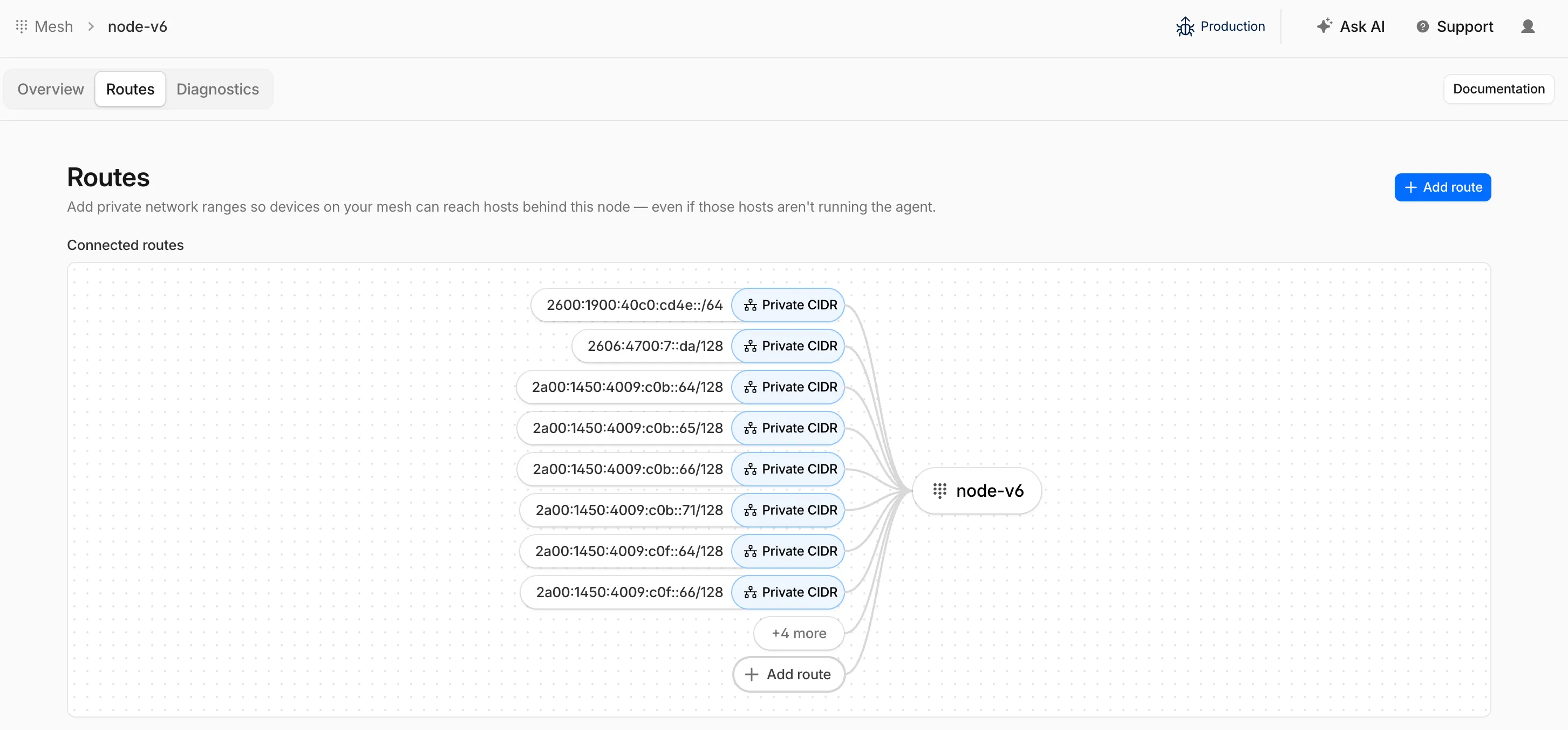
To add an IPv6 route, follow the same steps as adding an IPv4 route — enter the IPv6 CIDR (for example,
fd00::/64) when configuring the route in the dashboard ↗ or via the API.
Radar now provides TLD authoritative nameserver performance insights, measuring response time (latency) as observed from Cloudflare's 1.1.1.1 resolver infrastructure when forwarding queries upstream to TLD nameservers.
New widgets on TLD detail pages ↗:
- Aggregate nameserver latency ↗: Response time percentiles (p25/p50/p75) for all authoritative nameservers of the selected TLD.
- Latency per nameserver ↗: Median response time (p50) broken down by each authoritative nameserver over time.
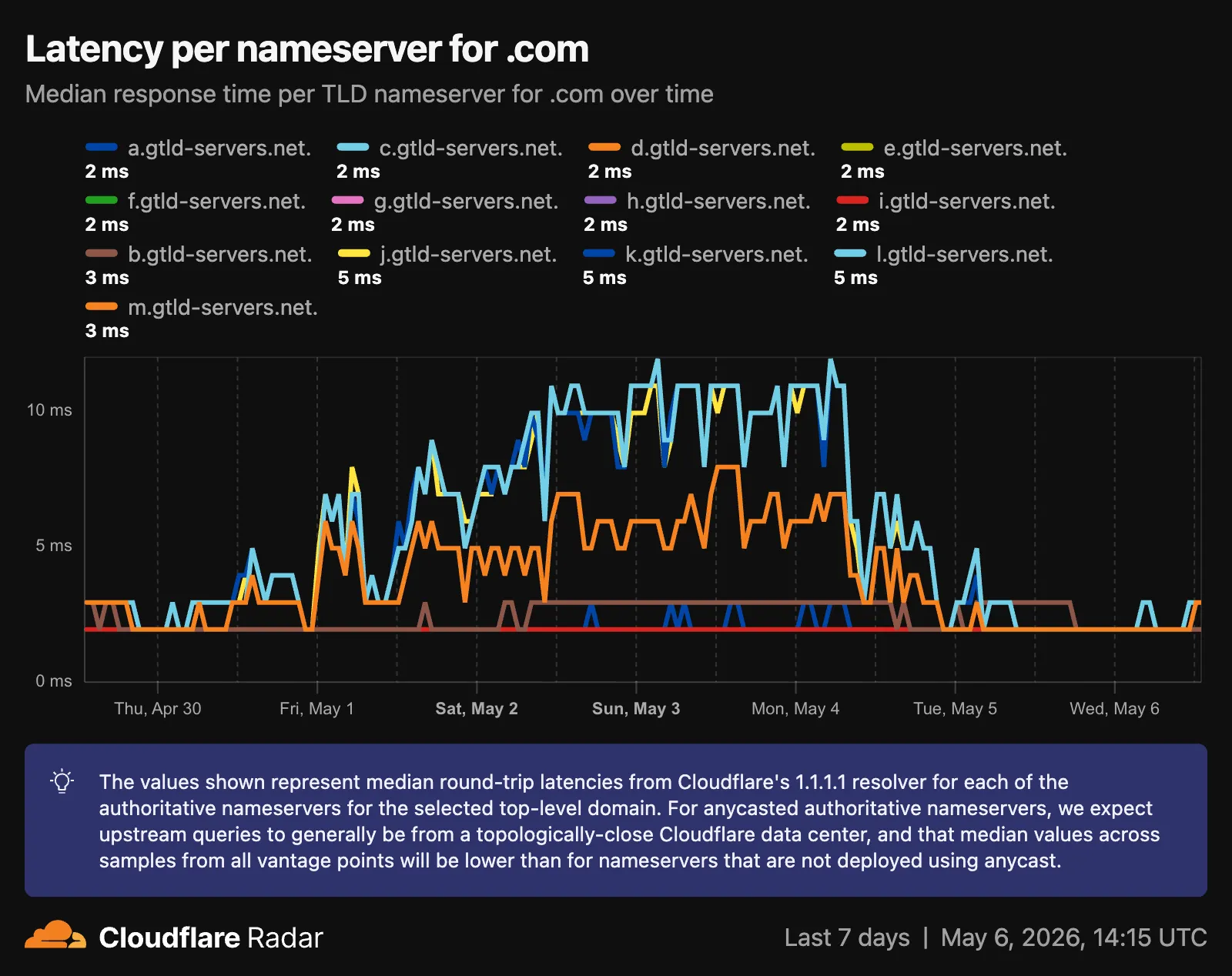
- Median latency geographic distribution ↗: p50 response time by Cloudflare data center country, displayed on a choropleth map.
- TLD ranking over time ↗: Daily DNS magnitude rank and magnitude value with a Rank/Magnitude toggle.
- Rank change deltas ↗: 1 week, 4 weeks, and 3 months rank changes added to the TLD magnitude table and the TLD detail info panel.
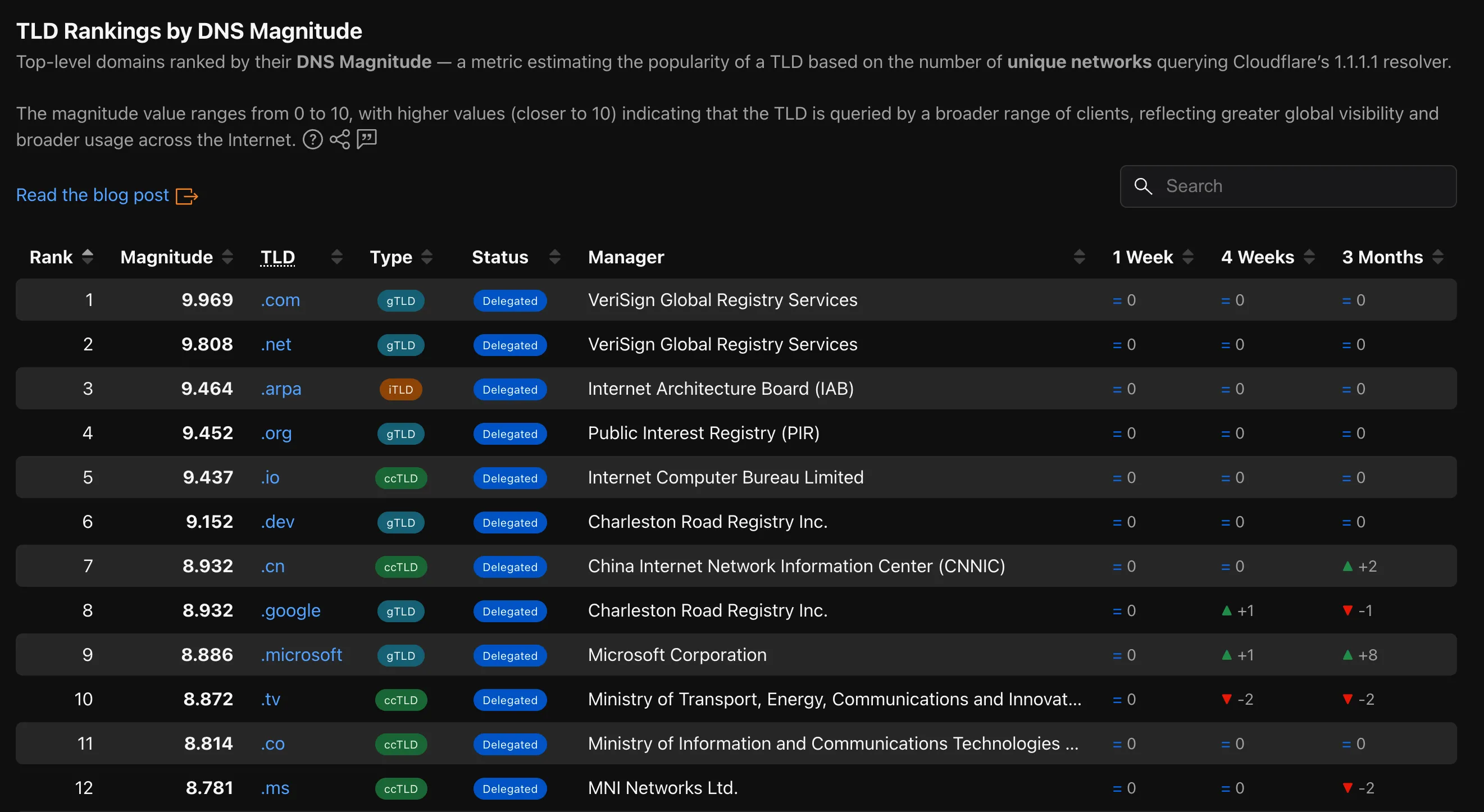
The new
TLD PerformanceAPI provides the following endpoints:/tlds/performance/summary/{dimension}— TLD nameserver performance summarized by dimension./tlds/performance/timeseries_groups/{dimension}— TLD nameserver performance over time grouped by dimension.
Available dimensions:
LATENCY(aggregate p25/p50/p75),NAMESERVER_LATENCY(per-nameserver p50),LOCATION_LATENCY(per-data-center-country p50).TLD Performance is also available as a dataset in the Data Explorer ↗.
Check out the updated TLD detail page ↗.
The Cloudforce One Threat Events API now supports TAXII ↗ as an output format, enabling standardized, automated sharing of cyber threat intelligence with your existing security stack.
- You can now ingest Cloudforce One threat data directly into your SIEM, TIP or SOAR tools that prefer TAXII-formatted streams without needing custom translation scripts.
- By supporting the TAXII format parameter in our API, security teams can automate the synchronization of indicator data, reducing the manual overhead of updating blocklists and detection rules.
- This alignment with industry standards ensures that your threat data remains consistent across different security ecosystems and partner integrations.
When calling the Threat Events API, you can now specify
taxiiin theformatquery parameter:GET /accounts/{account_id}/cloudforce_one/threat_events?format=taxiiYou can find the updated documentation in the Cloudflare API Reference ↗.
Cloudflare's cache now runs on a new proxy built on Pingora ↗, the Rust-based framework that already serves a significant portion of Cloudflare's network traffic. The new proxy is faster, more memory-safe, and designed to evolve our cache architecture. It delivers immediate performance improvements and enables new caching capabilities.
- Lower latency: The new proxy reduces per-request overhead through improved connection reuse.
- Reduced cache MISSes: Enhanced cache retention improves origin offload.
- Better RFC compliance: Caching behavior more closely follows HTTP caching standards.
- Foundation for future features: The new architecture enables upcoming improvements to cache functionality and efficiency.
- Asynchronous
stale-while-revalidate: Every request returns stale content immediately while revalidation happens in the background, instead of the first request after expiry blocking on the origin. Refer to the asynchronousstale-while-revalidatechangelog for details. - Unbuffered bypass by default: Responses that bypass cache are streamed directly to the client without buffering, reducing time-to-first-byte for uncacheable content.
The new architecture introduces the following behavioral changes to improve RFC compliance and correctness:
Vary: *results in cache bypass: According to RFC 9110 Section 12.5.5 ↗, aVaryheader value of*indicates the response varies on factors beyond request headers and must not be served from cache. Cloudflare now bypasses cache for these responses instead of storing them.Set-Cookiestripped on MISS and EXPIRED: For cacheable assets,Set-Cookieis now stripped on MISS and EXPIRED responses, not only on HITs.- Floating-point TTL values: Floating-point time-to-live values (for example,
max-age=1.5) are rounded down to the nearest integer instead of being rejected as invalid.
A deeper look at the new cache proxy is coming soon to the Cloudflare blog ↗. For background on the underlying framework, read:
You can now navigate, switch context, and take common actions in the Cloudflare dashboard without leaving your keyboard. Press
?anywhere to see the full list. Keyboard shortcuts can be disabled by visiting your profile settings ↗.Shortcut Action g hGo to Home g aGo to account overview g zGo to zone overview g pGo to your profile g wGo to Workers & Pages g oGo to Zero Trust g bGo to billing g 1–g 5Go to a recent or pinned item (by position in sidebar) t →Move to the next tab t ←Move to the previous tab p →Move to the next page of a table p ←Move to the previous page of a table Shortcut Action /Open quick search ?Show keyboard shortcuts s aSwitch account s zSwitch zone s .Star or unstar the current zone p .Pin or unpin the current page t sToggle the sidebar open or closed t mExpand or collapse all sidebar menus t aToggle Ask AI sidebar d .Toggle dark mode c uCopy the current URL c dCopy a deep link URL
Cloudflare Pipelines ingests streaming data via Workers or HTTP endpoints, transforms it with SQL, and writes it to R2 as Apache Iceberg tables. R2 Data Catalog manages those Iceberg tables, compaction, and compatibility with query engines like R2 SQL, Spark, and DuckDB.
You can now create and manage both products using Terraform, supported in the Cloudflare Terraform provider v5.19.0 ↗.
This adds four new resources that let you define your entire data pipeline as infrastructure-as-code: a data catalog, a stream for ingestion, a sink that writes to R2 Data Catalog or R2, and a pipeline that connects them with SQL.
The new Terraform resources are:
cloudflare_r2_data_catalog↗ — enable the data catalog on an R2 bucketcloudflare_pipeline_stream↗ — create a stream that receives events via HTTP or Worker bindingscloudflare_pipeline_sink↗ — create a sink that writes to R2 Data Catalog or R2cloudflare_pipeline↗ — create a pipeline with SQL connecting a stream to a sink
Here is a minimal example that creates a stream, an R2 Data Catalog sink, and a pipeline:
resource "cloudflare_pipeline_stream" "my_stream" {account_id = var.cloudflare_account_idname = "my_stream"format = { type = "json" }schema = {fields = [{name = "value"type = "json"required = true}]}http = { enabled = true, authentication = false, cors = {} }worker_binding = { enabled = false }}resource "cloudflare_pipeline_sink" "my_sink" {account_id = var.cloudflare_account_idname = "my_sink"type = "r2_data_catalog"format = { type = "parquet" }schema = { fields = [] }config = {account_id = var.cloudflare_account_idbucket = "my-pipeline-bucket"table_name = "my_table"token = var.catalog_token}}resource "cloudflare_pipeline" "my_pipeline" {account_id = var.cloudflare_account_idname = "my_pipeline"sql = "INSERT INTO ${cloudflare_pipeline_sink.my_sink.name} SELECT * FROM ${cloudflare_pipeline_stream.my_stream.name}"}For a full end-to-end example that includes R2 bucket creation, data catalog setup, and scoped API token provisioning, refer to the Pipelines Terraform documentation.
Radar is expanding its Routing section ↗ with two new widgets that give a deeper view into how networks announce address space and how RPKI ROA coverage evolves over time.
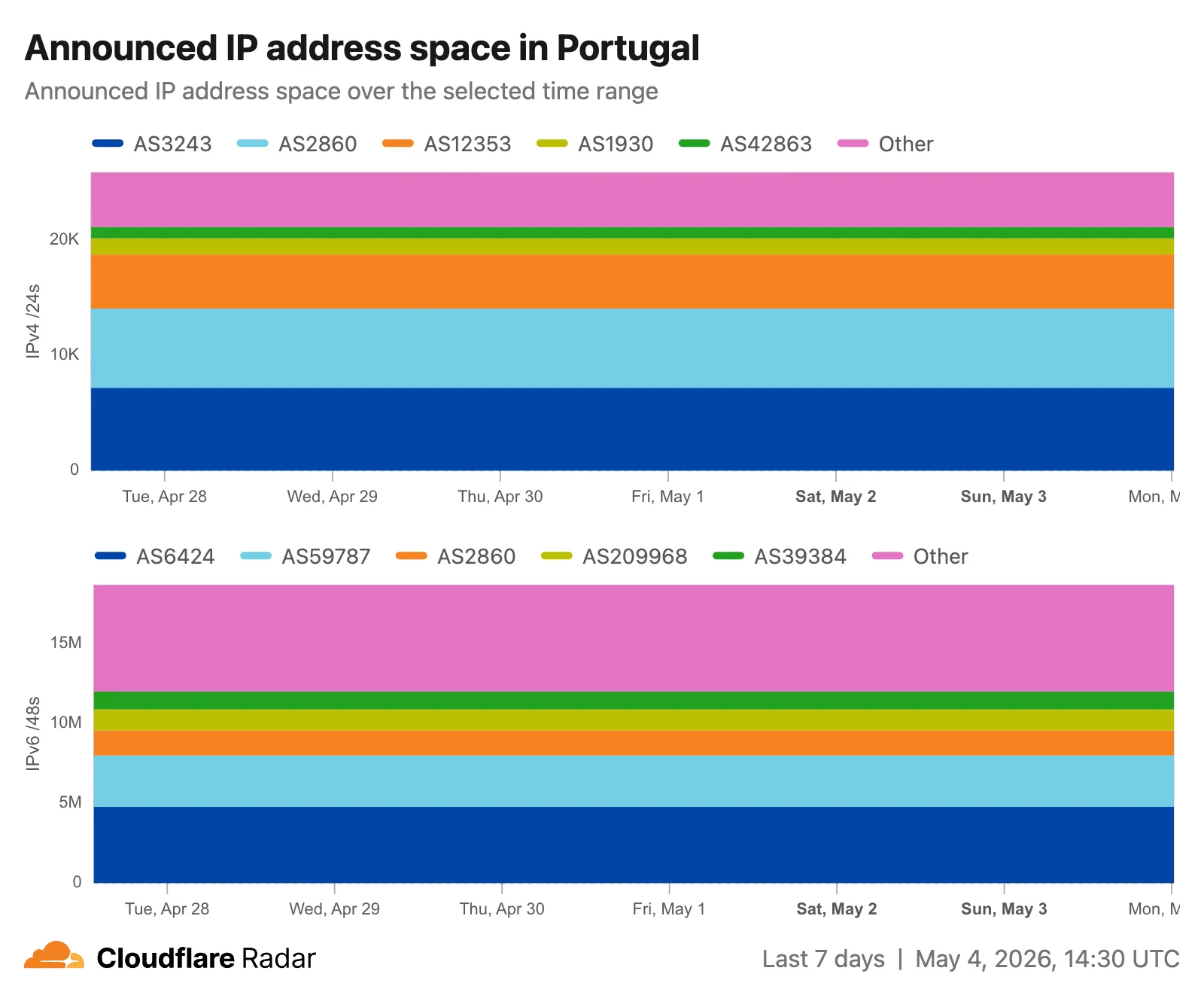
Country routing pages now include a Top ASes by announced IP space chart, breaking down the IPv4 and IPv6 address space announced from a country across the autonomous systems that originate it. The chart stacks the IPv4 and IPv6 views vertically, with the top contributing ASes called out by color and the remaining networks aggregated as Other.
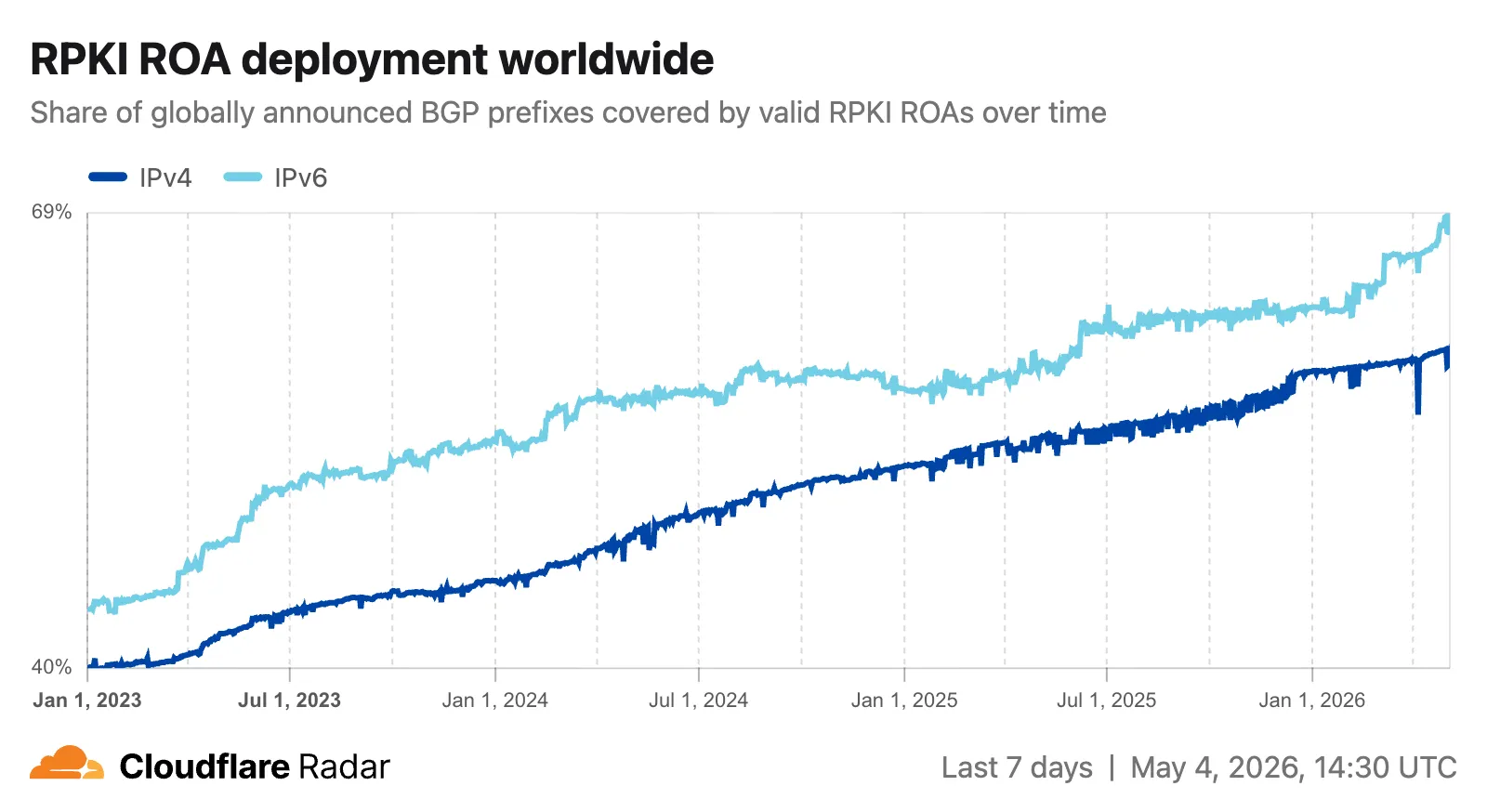
The RPKI sub-page ↗ adds an RPKI ROA deployment timeseries widget that tracks the share of announced BGP space covered by a valid Route Origin Authorization (ROA) over time, with separate IPv4 and IPv6 lines. A toggle switches the view between the share of covered prefixes and the share of covered IP address space. The widget is available on global, country, and AS views, so operators can monitor RPKI adoption progress and compare deployment trends across different scopes.
The data behind these widgets is also available through two new endpoints on the
BGPAPI:/bgp/ips/top/ases- Returns the top autonomous systems by announced IP space (IPv4/24s or IPv6/48s), globally or filtered by country, snapped to the nearest 8-hour RIB boundary./bgp/rpki/roas/timeseries- Returns RPKI ROA validation coverage over time, by share of prefixes or share of IP address space, split by IP version, with optional ASN or location filters.
Visit the Radar routing section ↗ to explore both widgets.
This week's release focuses on new detections to expand coverage across command injection, SQL injection, PHP object injection, remote code execution, and XSS attack vectors.
Key Findings
- Existing rule enhancements have been deployed to improve detection resilience against broad classes of web attacks and strengthen behavioral coverage.
Continuous Rule Improvements
We are continuously refining our managed rules to provide more resilient protection and deeper insights into attack patterns. To ensure an optimal security posture, we recommend consistently monitoring the Security Events dashboard and adjusting rule actions as these enhancements are deployed.
Ruleset Rule ID Legacy Rule ID Description Previous Action New Action Comments Cloudflare Managed Ruleset N/A XSS, HTML Injection - Object Tag - Body (beta) Log Block This is a new detection. This rule is merged into the original rule "XSS, HTML Injection - Object Tag" (ID:
Cloudflare Managed Ruleset N/A XSS, HTML Injection - Object Tag - Headers Log Block This is a new detection. The rule previously known as "XSS, HTML Injection - Object Tag - Headers (beta)" is now renamed to "XSS, HTML Injection - Object Tag - Headers".
Cloudflare Managed Ruleset N/A XSS, HTML Injection - Object Tag - URI Log Block This is a new detection. The rule previously known as "XSS, HTML Injection - Object Tag - URI (beta)" is now renamed to "XSS, HTML Injection - Object Tag - URI".
Cloudflare Managed Ruleset N/A Command Injection - Generic 9 - Body Vector - Beta N/A Disabled This is a new detection. This rule is merged into the original rule "Command Injection - Generic 9 - Body Vector" (ID:
Cloudflare Managed Ruleset N/A Command Injection - Generic 9 - Header Vector - Beta N/A Disabled This is a new detection. This rule is merged into the original rule "Command Injection - Generic 9 - Header Vector" (ID:
Cloudflare Managed Ruleset N/A Command Injection - Generic 9 - URI Vector - Beta N/A Disabled This is a new detection. This rule is merged into the original rule "Command Injection - Generic 9 - URI Vector" (ID:
Cloudflare Managed Ruleset N/A Command Injection - Sleep - Body N/A Disabled This is a new detection. The rule previously known as "Command Injection
- Sleep" is now renamed to "Command Injection - Sleep - Body".
Cloudflare Managed Ruleset N/A Command Injection - Sleep - Headers N/A Disabled This is a new detection. Cloudflare Managed Ruleset N/A Command Injection - Sleep - URI N/A Disabled This is a new detection. Cloudflare Managed Ruleset N/A Fortinet FortiSandbox - Command Injection - CVE:CVE-2026-39808 Log Block This is a new detection. Cloudflare Managed Ruleset N/A Remote Code Execution - Common Bash Bypass - Headers N/A Disabled This is a new detection. Cloudflare Managed Ruleset N/A Remote Code Execution - Common Bash Bypass - URI N/A Disabled This is a new detection. Cloudflare Managed Ruleset N/A Remote Code Execution - Common Bash Bypass - Body - Beta N/A Disabled This is a new detection. This rule is merged into the original rule "Remote Code Execution - Common Bash Bypass Body" (ID:
Cloudflare Managed Ruleset N/A PHP Object Injection - 2 - Body - Beta N/A Disabled This is a new detection. This rule is merged into the original rule "PHP Object Injection - 2" (ID:
Cloudflare Managed Ruleset N/A PHP Object Injection - 2 - Headers N/A Disabled This is a new detection. Cloudflare Managed Ruleset N/A PHP Object Injection - 2 - URI N/A Disabled This is a new detection. Cloudflare Managed Ruleset N/A SQLi - DROP - 2 - Beta N/A Disabled This is a new detection. This rule is merged into the original rule "SQLi - DROP - 2" (ID:
Cloudflare Managed Ruleset N/A SQLi - DROP - 2 - Headers N/A Disabled This is a new detection. Cloudflare Managed Ruleset N/A SQLi - DROP - 2 - URI N/A Disabled This is a new detection. Cloudflare Managed Ruleset N/A SmarterMail - Remote Code Execution - CVE:CVE-2026-24423 Log Block This is a new detection. Cloudflare Managed Ruleset N/A SQLi - SELECT Expression - Body Block Disabled Action changed Cloudflare Managed Ruleset N/A SQLi - String Concatenation - URI Block Disabled Action changed
You can now use
@cloudflare/dynamic-workflows↗ to run a Workflow inside a Dynamic Worker, ensuring durable execution for code that is loaded at runtime.The Worker Loader loads Dynamic Workers on demand, which previously made durability challenging. Even within a Dynamic Worker, a Workflow might sleep for hours or days between steps, and by the time it resumes, the original Dynamic Worker code would no longer be in memory.
The library solves this by tagging each Workflow instance with metadata that identifies which Dynamic Worker to load — for example, a tenant ID — then reloading the matching Dynamic Worker through the Worker Loader whenever a Workflow awakens.
Because Dynamic Workers are created on-demand, you do not have to register each Workflow up front or manage them individually. Load the Workflow code in the Dynamic Worker when it is needed, and the Workflows engine handles persistence and retries behind the scenes. Your Workflow code itself is unaffected by the routing and behaves as normal.
This unlocks patterns where the Workflow code itself is dynamic. For example, this is useful with:
- SaaS platforms where each tenant defines their own automation, such as onboarding sequences, approval chains, or billing retry logic.
- AI agent frameworks where agents generate and execute multi-step plans at runtime, surviving restarts and waiting for human approval between tool calls.
- Multi-tenant job systems where each customer submits their own processing logic and every step persists progress and retries on failure.
TypeScript import {createDynamicWorkflowEntrypoint,DynamicWorkflowBinding,wrapWorkflowBinding,type WorkflowRunner,} from "@cloudflare/dynamic-workflows";export { DynamicWorkflowBinding };interface Env {WORKFLOWS: Workflow;LOADER: WorkerLoader;}function loadTenant(env: Env, tenantId: string) {return env.LOADER.get(tenantId, async () => ({compatibilityDate: "2026-01-01",mainModule: "index.js",modules: { "index.js": await fetchTenantCode(tenantId) },// The Dynamic Worker uses this exactly like a real Workflow binding;// every create() is tagged with { tenantId } automatically.env: { WORKFLOWS: wrapWorkflowBinding({ tenantId }) },}));}// The entrypoint name must match `class_name` in the workflows binding of your Wrangler config file.export const DynamicWorkflow = createDynamicWorkflowEntrypoint<Env>(async ({ env, metadata }) => {const stub = loadTenant(env, metadata.tenantId as string);return stub.getEntrypoint("TenantWorkflow") as unknown as WorkflowRunner;},);export default {fetch(request: Request, env: Env) {const tenantId = request.headers.get("x-tenant-id")!;return loadTenant(env, tenantId).getEntrypoint().fetch(request);},};For a full walkthrough, refer to the Dynamic Workflows guide.
Cloudflare IPsec now supports post-quantum key agreement with compatible third-party devices. Cisco ↗ and Fortinet ↗ are the first third-party vendors validated to interoperate with Cloudflare IPsec using ML-KEM (Module-Lattice-Based Key-Encapsulation Mechanism).
Post-quantum IPsec uses RFC 9370 ↗ and draft-ietf-ipsecme-ikev2-mlkem ↗ to negotiate hybrid key agreement during the IKEv2
IKE_INTERMEDIATEphase. This combines classical Diffie-Hellman (Group 20) with ML-KEM-768 or ML-KEM-1024 to protect against harvest-now, decrypt-later ↗ attacks.Key details:
- Compatible with Cisco 8000 Series Secure Routers with IOS XR Release 26.1.1 and Fortinet FortiOS 7.6.6 and later.
- Uses ML-KEM-768 or ML-KEM-1024 as an additional Key Exchange to DH Group 20.
- Follows RFC 9370 and draft-ietf-ipsecme-ikev2-mlkem standards.
- No additional licensing required.
Post-quantum IPsec with third-party devices is now generally available with confirmed interoperability for the platforms listed above. Cloudflare intends to support interoperability with more vendors as they build out support for draft-ietf-ipsecme-ikev2-mlkem. Contact your account team to discuss support for additional vendors.
For supported key exchange methods and the list of validated platforms, refer to GRE and IPsec tunnels.
Cloudflare DLP now includes Data Classification, which lets administrators organize and label sensitive content using labels, templates, and reusable data classes.
With Data Classification, administrators can define labels such as sensitivity schemas and levels, and data tag groups and tags. Administrators can also build from Cloudflare-managed templates and create reusable data classes that combine detection entries, other data classes, sensitivity levels, and data tags.
You can then use those classifications in custom DLP profiles to identify the severity of sensitive content, understand where it exists, and apply that logic consistently across DLP profiles.
For more information, refer to Data Classification.
Cloudflare DLP now includes new predefined detection entries.
The expanded catalog includes detections for specific credential types, webhooks, addresses, tax identifiers, national IDs, financial data, and crypto wallets.
Examples include
GitHub PAT,OpenAI API Key,Slack Webhook,Discord Webhook,US Physical Address, andBitcoin Wallet.For the full list, refer to Predefined detection entries.
Full Changelog: v6.10.0...v7.0.0 ↗
This is a major version release that includes breaking changes to three packages:
ai_search,email_security, andworkers. These changes reflect upstream API specification updates that improve type correctness and consistency.Please ensure you read through the list of changes below before moving to this version - this will help you understand any down or upstream issues it may cause to your environments.
See the v7.0.0 Migration Guide ↗ for before/after code examples and actions needed for each change.
The
SearchForAgentsnested type has been removed from all instance metadata structs. This field is no longer part of the API specification.Removed Types:
InstanceNewResponseMetadataSearchForAgentsInstanceUpdateResponseMetadataSearchForAgentsInstanceListResponseMetadataSearchForAgentsInstanceDeleteResponseMetadataSearchForAgentsInstanceReadResponseMetadataSearchForAgentsInstanceNewParamsMetadataSearchForAgentsInstanceUpdateParamsMetadataSearchForAgentsNamespaceInstanceNewResponseMetadataSearchForAgentsNamespaceInstanceUpdateResponseMetadataSearchForAgentsNamespaceInstanceListResponseMetadataSearchForAgentsNamespaceInstanceDeleteResponseMetadataSearchForAgentsNamespaceInstanceReadResponseMetadataSearchForAgentsNamespaceInstanceNewParamsMetadataSearchForAgentsNamespaceInstanceUpdateParamsMetadataSearchForAgents
Multiple Email Security settings sub-resources have changed their path parameter types from
int64tostring:AllowPolicies(policyID int64->policyID string)BlockSenders(patternID int64->patternID string)Domains(domainID int64->domainID string)ImpersonationRegistry(displayNameID int64->impersonationRegistryID string)TrustedDomains(trustedDomainID int64->trustedDomainID string)
The
Investigate.Get,Investigate.Move.New, andInvestigate.Reclassify.Newmethods now useinvestigateIDinstead ofpostfixIDas the path parameter name.The
SettingDomainService.BulkDeletemethod and its associated types have been removed:SettingDomainBulkDeleteResponseSettingDomainBulkDeleteParams
SettingTrustedDomainService.Newnow returns*SettingTrustedDomainNewResponseinstead of*SettingTrustedDomainNewResponseUnion.InvestigateMoveService.Newnow returns*pagination.SinglePage[InvestigateMoveNewResponse]instead of*[]InvestigateMoveNewResponse.The observability telemetry filter parameter types have been restructured to support nested filter groups. New discriminated union types replace the previous flat filter arrays:
ObservabilityTelemetryKeysParams.Filtersnow acceptsFiltersObjectFilterUnion(was[]interface\{\})ObservabilityTelemetryQueryParams.Parameters.Filtersnow acceptsFiltersObjectFilterUnionObservabilityTelemetryValuesParams.Filtersnow acceptsFiltersObjectFilterUnion
New types include
FiltersObjectFiltersObject(for group filters withFilterCombination) andFiltersWorkersObservabilityFilterLeaf(for leaf filters with typedOperation,Type, andValuefields).NEW SERVICE: Query organization audit logs with cursor-based pagination.
List()- Retrieve audit logs
client.BrowserRendering.Devtools.Browser.Targets.Close()- Close a specific browser target (tab, page) by ID
client.Queues.GetMetrics()- Retrieve queue metrics for a specific queue
- Added
WaitForCompletionparameter toNamespaceInstanceItemNewOrUpdateParamsandNamespaceInstanceItemSyncParamsfor synchronous indexing confirmation
- Magic Transit:
ConnectorService.Listparameter name corrected fromquerytoparams(non-functional, affects generated documentation only)
None in this release.
You can now empty an entire R2 bucket or delete folders directly from the dashboard. Emptying a bucket is required before you can delete it. Previously, this required scripting or configuring lifecycle rules. Now, the dashboard can handle it in a single action.
Go to your bucket's Settings tab and select Empty under the Empty Bucket section. This deletes all objects in the bucket while preserving the bucket and its configuration. For large buckets, the operation runs in the background and the dashboard displays progress.
Emptying a bucket is also a prerequisite for deleting it. The dashboard now guides you through both steps in one place.
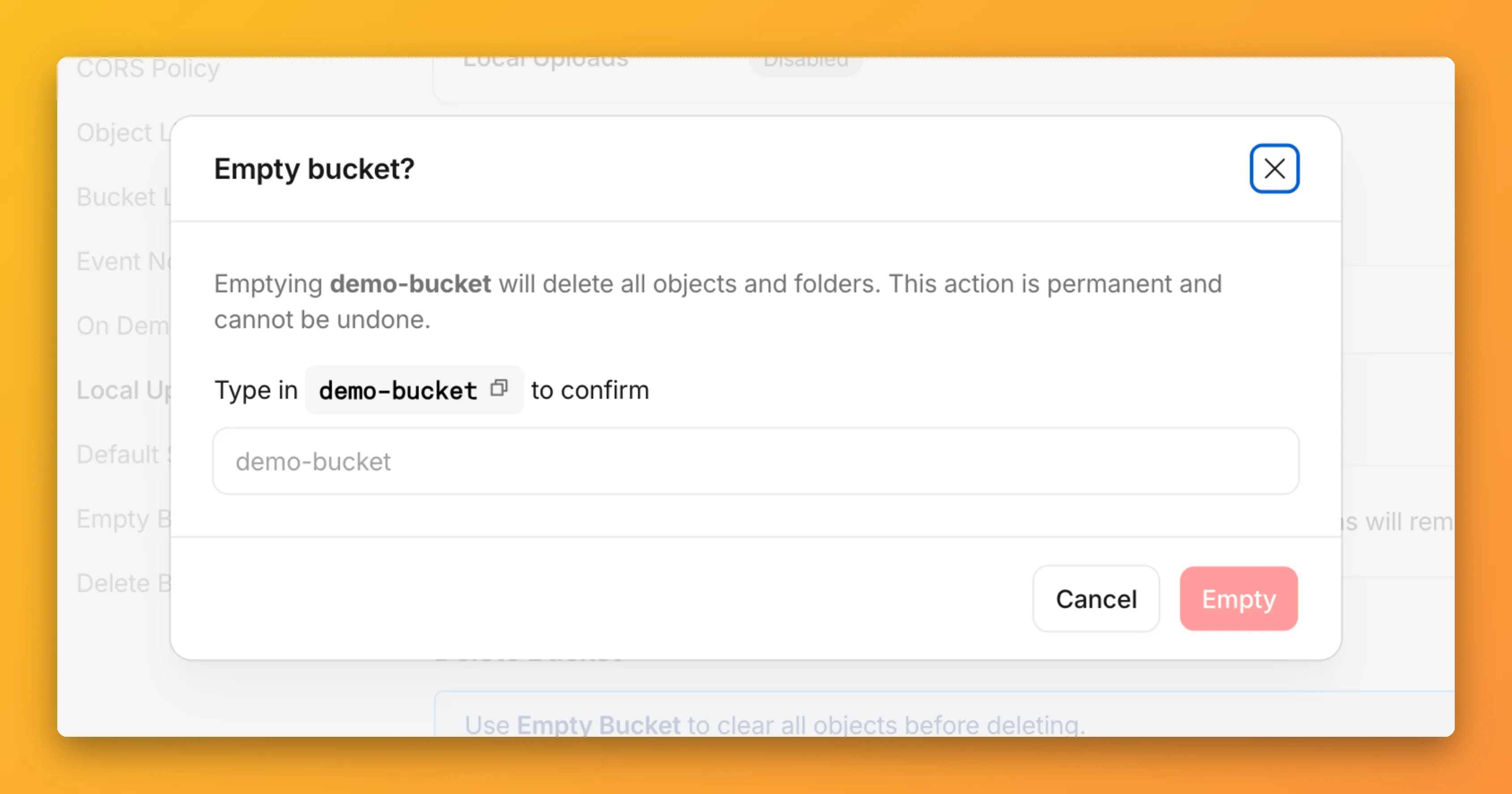
R2 uses a flat object structure. The dashboard groups objects that share a common prefix into folders when the View prefixes as directories checkbox is selected. Deleting a folder removes every object under that prefix.
From the Objects tab, you can select one or more folders and delete them alongside individual objects.
For step-by-step instructions, refer to Delete buckets and Delete objects.
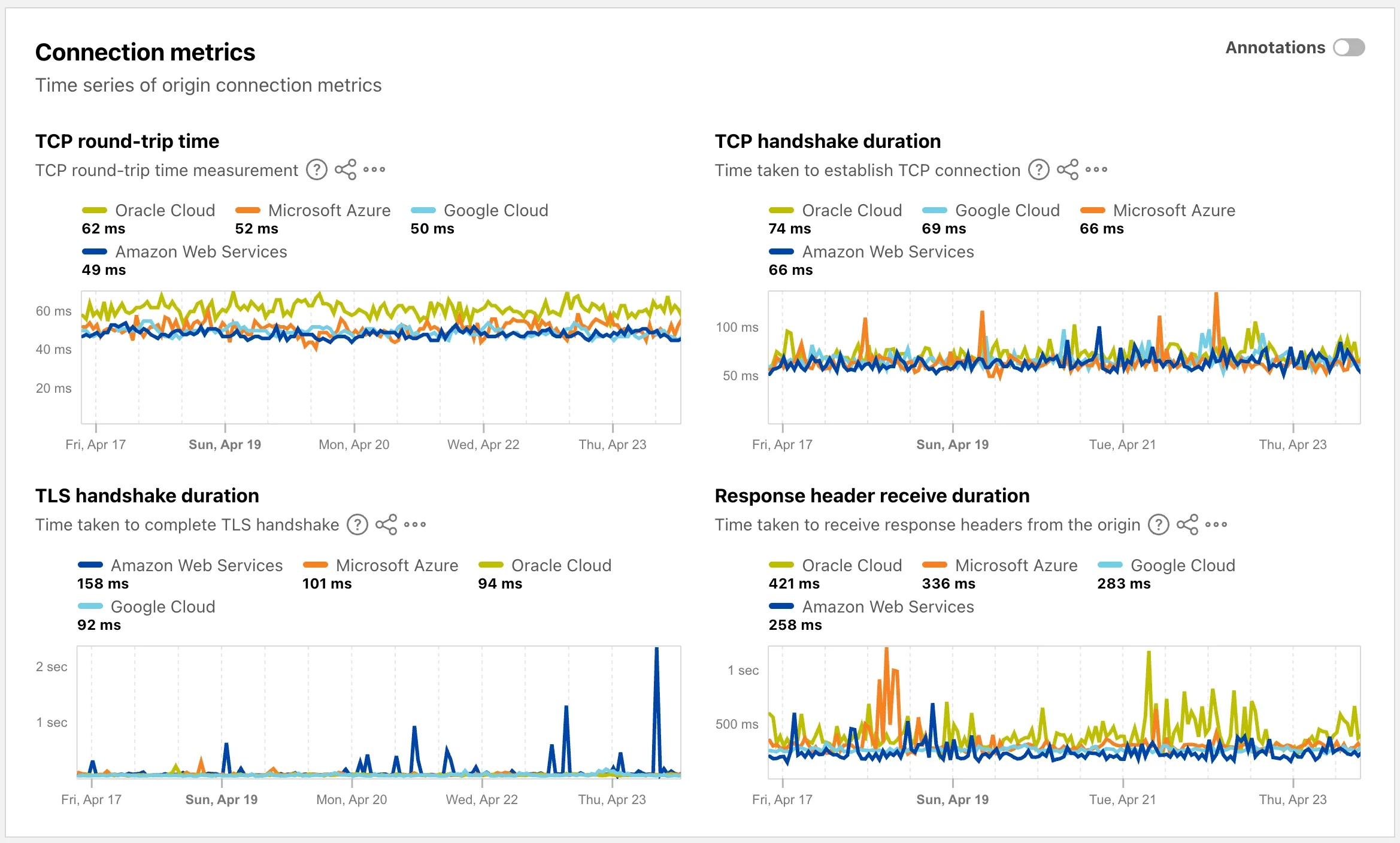
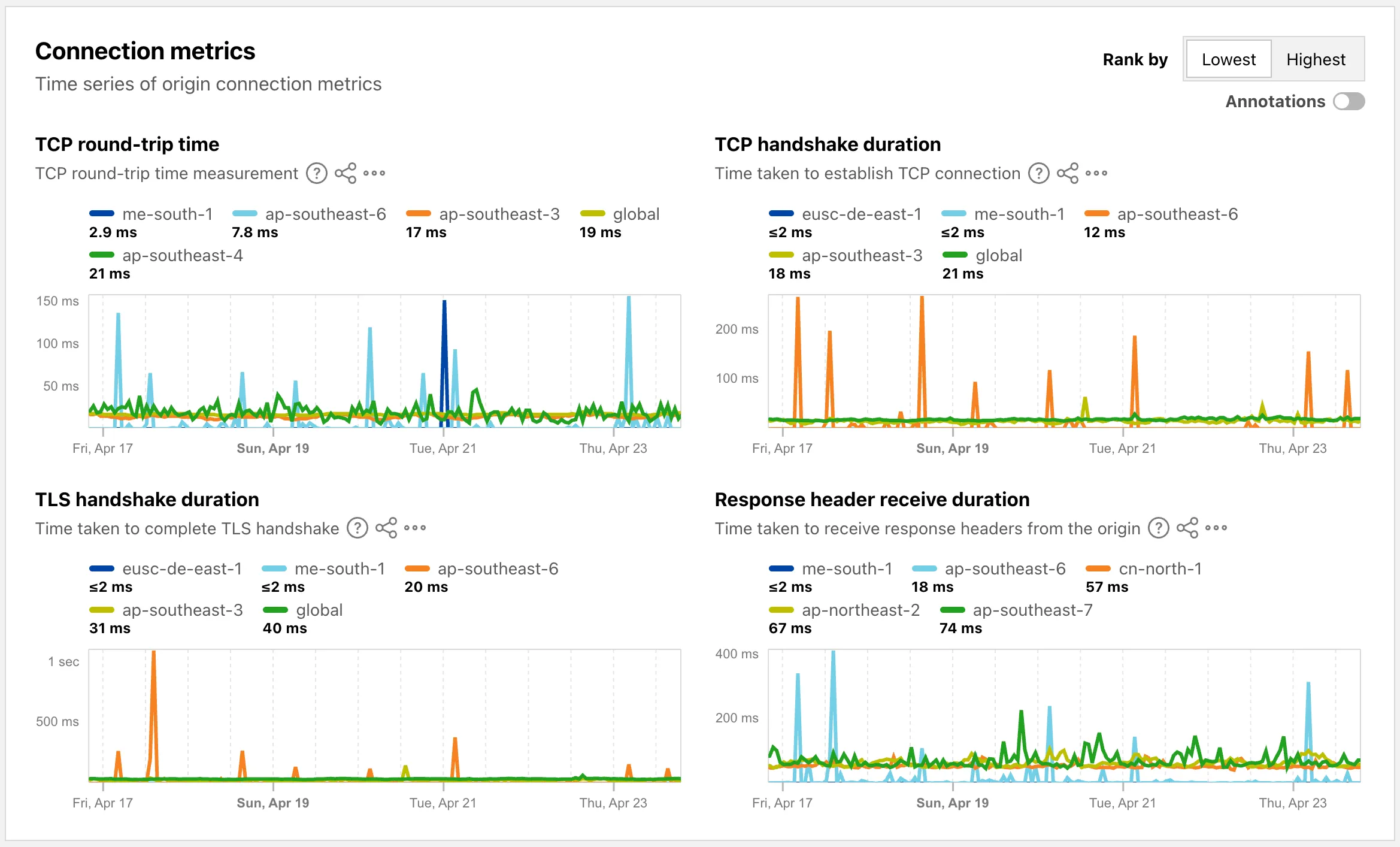
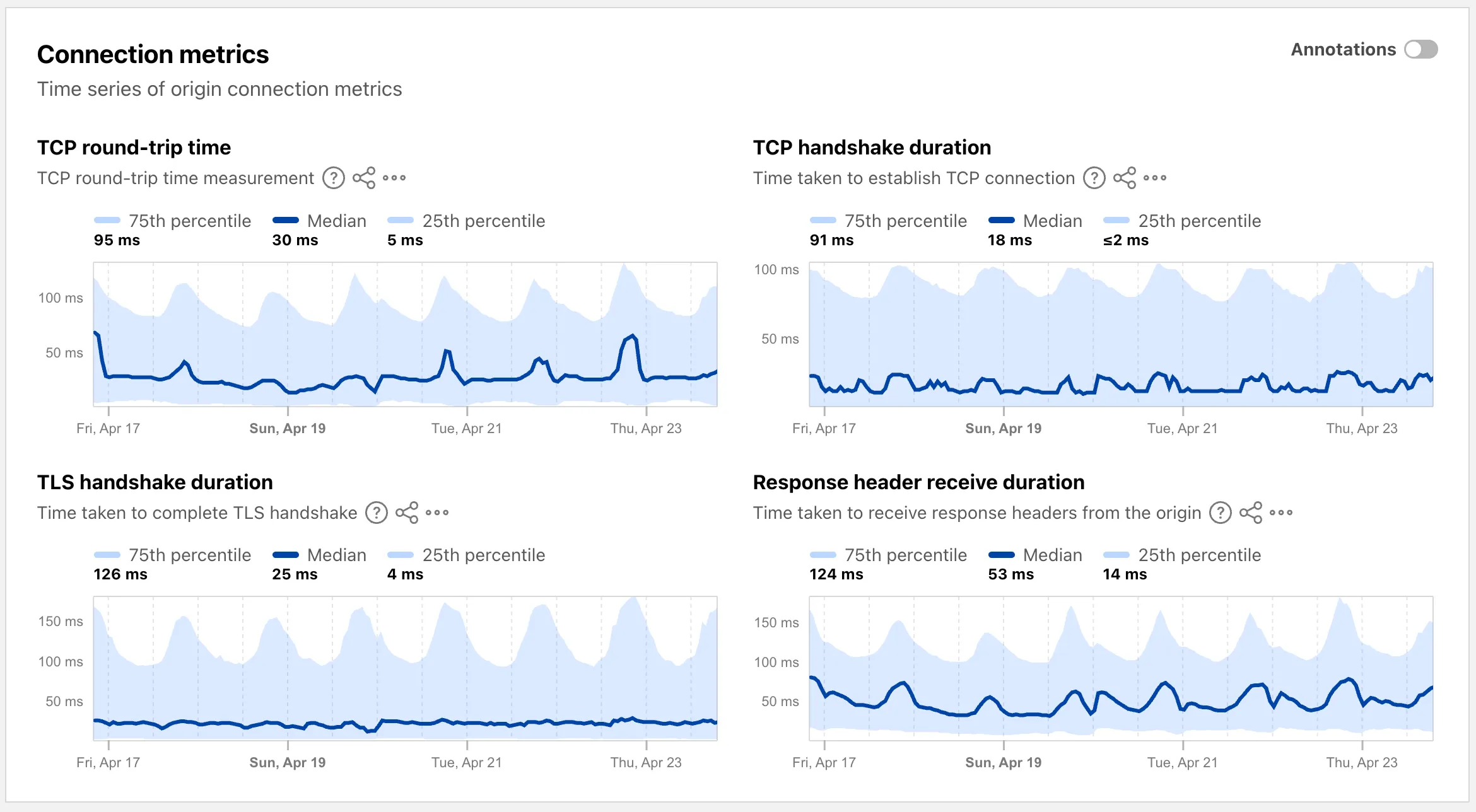
The Cloud Observatory ↗ on Radar now provides improved connection metric insights, offering new ways to explore TCP round-trip time, TCP handshake duration, TLS handshake duration, and response header receive duration across cloud provider origin servers.
The Cloud Observatory overview ↗ now shows connection metrics broken down by cloud provider, making it easy to compare connection performance across Amazon Web Services, Google Cloud, Microsoft Azure, and Oracle Cloud.
Each provider page ↗ now shows connection metrics for the top five regions, with a selector to rank by lowest or highest values.
Each region page ↗ now displays connection metrics as percentile distributions (25th percentile, median, and 75th percentile), providing insight into the range and variability of connection times.
These views are also available through the
OriginsAPI, using thetimeseries_groupsendpoint with theORIGIN,REGION, orPERCENTILEdimension.
Radar now supports dark mode. A theme selector in the upper right corner of the page lets users explicitly choose between three display options:
- Light — standard light theme
- Dark — full dark theme
- System — follows the operating system preference
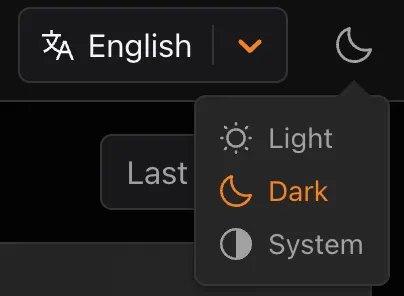
The selected theme applies consistently across all Radar pages and widgets.
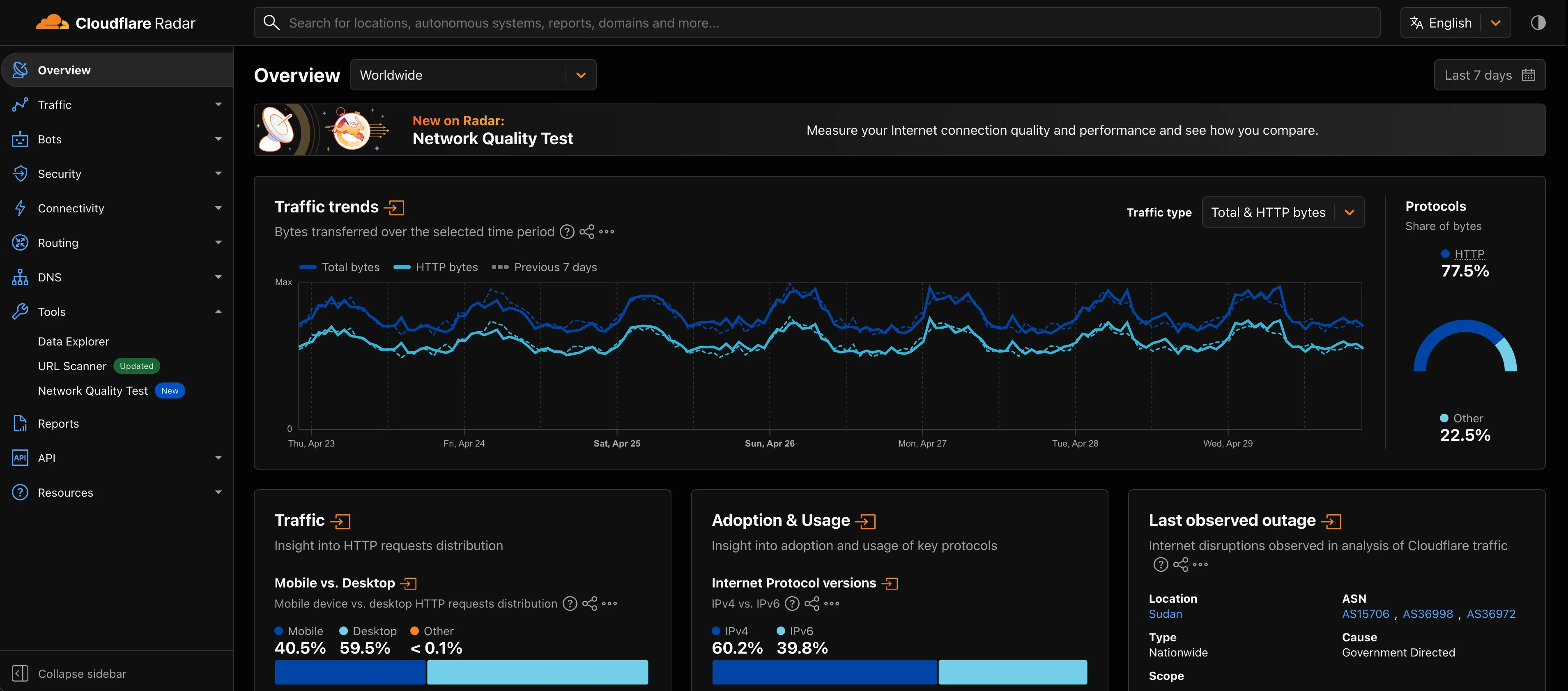
The theme choice also applies to shared and embedded graphs.
Try it out at Cloudflare Radar ↗.
Full Changelog: v4.3.1...v5.0.0 ↗
This is a major release of the Cloudflare Python SDK. It drops support for Python 3.8, adds 11 new API services, introduces optional aiohttp backend support for improved async concurrency, and includes hundreds of type and method updates across the entire API surface.
Please review the breaking changes below before upgrading. A migration guide is available at v5.0.0 Migration Guide ↗.
- Python 3.8 is no longer supported. The minimum required version is now Python 3.9.
typing-extensionsminimum version bumped from>=4.10to>=4.14.
The following resources have breaking changes. See the v5.0.0 Migration Guide ↗ for detailed migration instructions.
abusereportsacm.totaltlsapigateway.configurationscloudforceone.threateventsd1.databaseintel.indicatorfeedslogpush.edgeorigintlsclientauth.hostnamesqueues.consumersradar.bgprulesets.rulesschemavalidation.schemassnippetszerotrust.dlpzerotrust.networks
The async client now supports an optional
aiohttpHTTP backend for improved concurrency performance. Install withpip install cloudflare[aiohttp]and useDefaultAioHttpClient()as thehttp_clientparameter.Python 3.13 and 3.14 are now tested and supported.
The following top-level resources are new in this release:
Resource Client Path Description AI Search aisearchAI-powered search capabilities Connectivity connectivityConnectivity testing and diagnostics Email Sending email_sendingEmail send and send_raw endpoints Fraud fraudFraud detection and prevention Google Tag Gateway google_tag_gatewayGoogle Tag Gateway management Organizations organizationsOrganization audit logs and management R2 Data Catalog r2_data_catalogR2 Data Catalog operations Realtime Kit realtime_kitRealtime communication (Calls/TURN) Resource Tagging resource_taggingResource tagging and labeling Token Validation token_validationToken validation configuration and rules Vulnerability Scanner vulnerability_scannerVulnerability scanning, credential sets, and target environments - api_gateway: Labels endpoints
- billing: Billable usage PayGo endpoint
- brand_protection: v2 endpoints
- browser_rendering: DevTools methods
- cache: Origin cloud regions resource
- custom_origin_trust_store: Custom origin trust store
- dns:
dns_records/usageendpoints - email_security: Phishguard reports endpoint
- iam: User groups and user group members resources
- radar: Botnet Threat Feed and Post-Quantum endpoints
- workers: Observability Destinations resources
- zero_trust: Access Users, DEX rules, Device IP Profile, Device Subnet, WARP Connector connections and failover, WARP Subnet, Gateway PAC files
- zones: Zone environments endpoints
- Fixed
polymorphic_serializationparameter inmodel_dumpoverrides - Added
BaseModelbase to responseSchemaFieldStruct/SchemaFieldListstubs in Pipelines - Added missing
model_rebuild/update_forward_refsforSharedEntryCustomEntryclasses in DLP - Made
RunQueryParametersNeedleValueaBaseModelwitharbitrary_types_allowedin Workers - Removed duplicate
notification_urlfield in webhook response types for Stream - Resolved pre-existing codegen type errors
- Fixed
type: ignore[call-arg]placement for mypy compatibility in Radar
Resources with
@deprecatedannotations on some methods include:accounts,addressing,ai-gateway,aisearch,api-gateway,billing,cloudforce-one,dns,email-routing,email-security,filters,firewall,images,intel,kv,logpush,origin-tls-client-auth,pages,pipelines,radar,rate-limits,registrar,rulesets,ssl,user,workers,workers-for-platforms,zero-trust,zones
Full Changelog: v6.0.0-beta.2...v6.0.0 ↗
This is a major version release of the Cloudflare TypeScript SDK. It includes 11 entirely new top-level API resources, new sub-resources and methods across 50+ existing resources, SDK infrastructure improvements, and breaking changes to the generated API surface from the v5.x line.
Please ensure you read through the list of changes below before moving to this version - this will help you understand any down or upstream issues it may cause to your environments.
- Retry-After handling changed: The SDK now respects any server-specified
Retry-Aftervalue for rate-limited requests. Previously, values over 60 seconds were ignored and a default backoff was used instead. - Empty response handling: Responses with
content-length: 0now returnundefinedinstead of attempting to parse the body. - Environment variable reading: Empty string env vars (for example,
CLOUDFLARE_API_TOKEN="") are now treated as unset. - Path query parameter merging: URL search params embedded in endpoint paths are now extracted and merged into the query object.
17 HTTP endpoints were removed from the SDK, affecting
abuse-reports,cloudforce-one,dlp/profiles/predefined,email-security/investigate,email-security/settings, andintel/ip-list.client.ai.toMarkdown.transform(file, \{ ...params \})->client.ai.toMarkdown.transform(\{ ...params \})--filemoved from positional arg into params bodyclient.radar.ai.toMarkdown.create(body, \{ ...params \})->client.radar.ai.toMarkdown.create(\{ ...params \})--bodymoved from positional arg into paramsclient.abuseReports.create(reportType, \{ ...params \})->client.abuseReports.create(reportParam, \{ ...params \})-- positional arg renamedclient.iam.userGroups.members.create(userGroupId, [ ...body ])->client.iam.userGroups.members.create(userGroupId, [ ...members ])-- body array param renamed
client.originTLSClientAuth.hostnames.certificates->client.originTLSClientAuth.zoneCertificatesclient.radar.netflows->client.radar.netFlows(casing change)
- 133 methods now return
nullinstead of a typed response object. This primarily affects delete operations acrossaccounts,cache,d1,filters,firewall,hyperdrive,iam,kv,logpush,logs,r2,stream,workers,zero-trust,zones, and others. - 17 methods changed pagination type (for example,
KeysCursorPaginationAfter->KeysCursorLimitPagination). - 29 methods changed to a different named type (for example,
CloudflaredCreateResponse->CloudflareTunnel).
24 shared types removed from root namespace (
ASN,AuditLog,Member,Permission,Role,Subscription,Token, etc.). 19 response types consolidated or renamed.19 resources were restructured from single files to directories. Public API client paths are unchanged, but deep imports may break.
11 entirely new resources added to the client:
Resource Client Path Methods Description AI Search client.aiSearch46 Instances, namespaces, tokens, and items Connectivity client.connectivity5 Directory service APIs Email Sending client.emailSending7 Send and send_raw endpoints Fraud client.fraud2 Fraud detection API Google Tag Gateway client.googleTagGateway2 Google Tag Gateway management Organizations client.organizations8 Organization profiles and audit logs R2 Data Catalog client.r2DataCatalog11 R2 Data Catalog routes Realtime Kit client.realtimeKit54 Realtime Kit APIs Resource Tagging client.resourceTagging9 Resource tagging routes Token Validation client.tokenValidation13 Token validation rules Vulnerability Scanner client.vulnerabilityScanner21 Vulnerability scanning - browser-rendering:
crawl,devtools- Crawl endpoints and DevTools methods - cache:
origin-cloud-regions- Origin cloud regions resource - dns:
usage- DNS records usage endpoints - d1:
time-travel- Time travel get_bookmark and restore - email-security:
phishguard- Phishguard reports endpoint - pipelines:
sinks,streams- Pipelines restructure - radar:
agent-readiness,geolocations,post-quantum- New analytics endpoints - workers:
observability- Observability destinations - zones:
environments- Zone environments endpoints - api-gateway:
labels- Labels endpoints - brand-protection:
v2- V2 endpoints - alerting:
silences- Alert silencing API - billing:
usage- Billable usage PayGo endpoint - iam:
sso- SSO Connectors resource - queues:
getMetricsmethod - Queues metrics endpoint - registrar:
registration-status,update-status- Registrar API convergence - zero-trust: DLP settings, DEX rules, Access Users, WARP Connector, WARP Subnets, Gateway PAC files, Gateway tenants
- Resolved type errors from codegen overwriting manual fixes
- Fixed
post()usage for to-markdown endpoints to resolve async type error - Added least-privilege permissions to all workflow jobs
- Reverted erroneous removal of rulesets resource methods and types
- Resolved prettier formatting errors in codegen output
The following resources now include
@deprecatedannotations on some methods:accounts,addressing,ai-gateway,aisearch,api-gateway,billing,cloudforce-one,custom-nameservers,dns,email-routing,email-security,filters,firewall,images,intel,keyless-certificates,kv,logpush,origin-tls-client-auth,page-shield,pages,pipelines,radar,rate-limits,registrar,rulesets,ssl,user,workers,workers-for-platforms,zero-trust,zones- Retry-After handling changed: The SDK now respects any server-specified
Shared dictionaries (RFC 9842 ↗) let an origin compress a response against a previous version of the same resource that the browser already has cached, so only the difference between versions travels over the wire. Shared dictionaries passthrough is now in open beta on all plans.
In passthrough mode, Cloudflare:
- Forwards the
Use-As-DictionaryandAvailable-Dictionaryheaders between client and origin without modification. - Treats
dcb(Dictionary-Compressed Brotli) anddcz(Dictionary-Compressed Zstandard) as validContent-Encodingvalues end to end, without recompressing them. - Extends the cache key to vary on
Available-DictionaryandAccept-Encodingso each delta-compressed variant is cached correctly.
Your origin manages the dictionary lifecycle: deciding which assets are dictionaries, attaching
Use-As-Dictionaryheaders, and producing deltas in response toAvailable-Dictionaryrequests. Cloudflare handles the transport and the cache.In internal testing on a 272 KB JavaScript bundle, the asset shrinks from 92.1 KB with Gzip to 2.6 KB with delta Zstandard against the previous version — a 97% reduction over standard compression — with download times improving by 81–89% versus Gzip.
Shared dictionaries work with browsers that advertise
dcbordczinAccept-Encoding. Today, this includes Chrome 130 or later and Edge 130 or later.Turn on passthrough for your zone with a single API call:
Terminal window curl "https://api.cloudflare.com/client/v4/zones/$ZONE_ID/settings/shared_dictionary_mode" \--request PATCH \--header "Authorization: Bearer $CLOUDFLARE_API_TOKEN" \--json '{"value": "passthrough"}'You can also turn it on under Speed > Settings > Content Optimization in the Cloudflare dashboard ↗. For full origin setup instructions and a working test recipe, refer to Shared dictionaries, or try the live demo at canicompress.com ↗.
- Forwards the
This emergency release introduces a new rule to block a cPanel & WHM Authentication Bypass related to CVE-2026-41940.
Key Findings
- CVE-2026-41940: A critical authentication bypass vulnerability in cPanel & WHM allows unauthenticated remote attackers to bypass authentication mechanisms and gain unauthorized administrative access to the web hosting control panel. This vulnerability affects the session validation logic, enabling attackers to craft malicious requests that circumvent normal authentication checks.
Impact
Successful exploitation allows unauthenticated attackers to gain administrative control over affected cPanel & WHM installations. This leads to complete server compromise, potential theft or manipulation of hosted data, and significant service disruption across managed environments.
We strongly recommend applying official vendor patches for cPanel & WHM immediately to address the underlying vulnerability.
Ruleset Rule ID Legacy Rule ID Description Previous Action New Action Comments Cloudflare Managed Ruleset N/A cPanel - Auth Bypass - CVE:CVE-2026-41940 N/A Block This is a new detection.
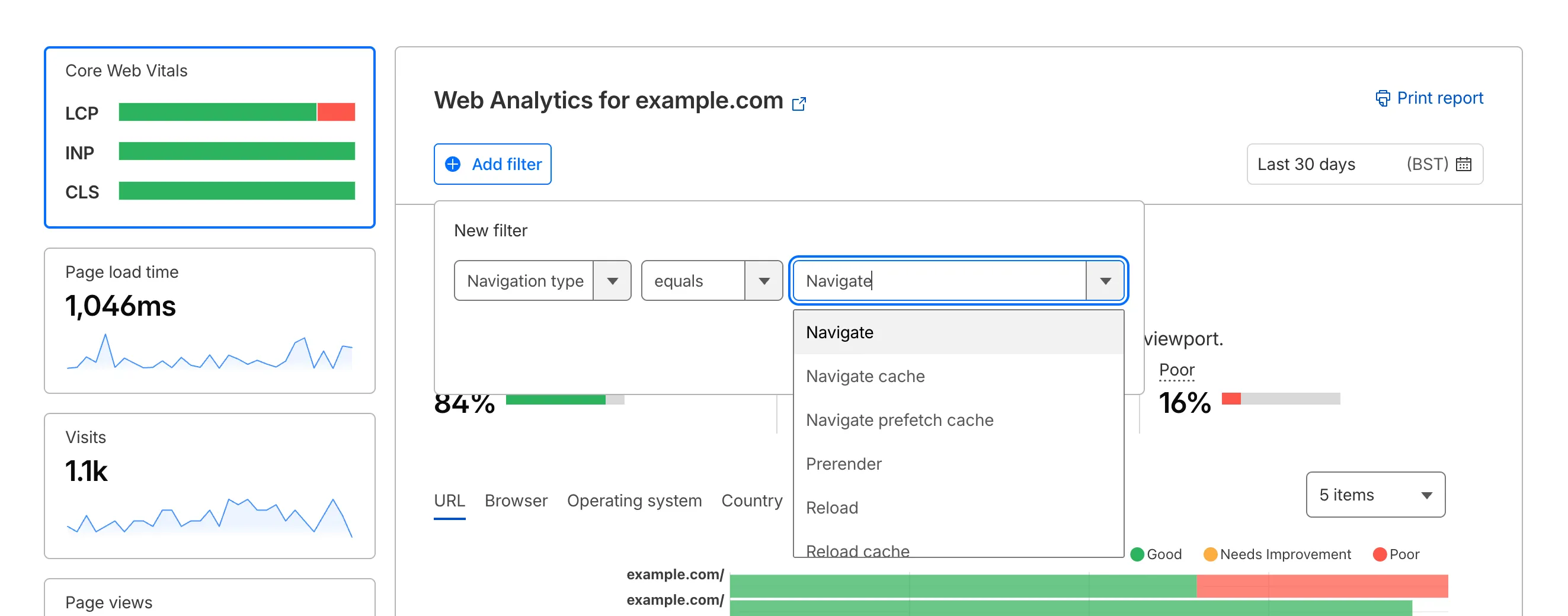
Cloudflare Web Analytics now supports Navigation Type reporting and filtering.
This update allows developers and performance analysts to see how users are navigating between pages — whether through a link click or form submission, a page reload, or using the browser's back/forward buttons — and whether a browser cache hit occurred for these behaviors.
Understanding navigation types is critical for optimizing user experience. For example, if a high volume of your traffic consists of "Back-forward" navigations versus "Back-forward Cache", those visitors are not benefiting from the Back/Forward Cache (bfcache) and therefore are experiencing higher load times due to potentially unnecessary network requests.
The same applies for regular "Navigate" entries — where "Navigate Cache", "Navigate Prefetch Cache" and "Prerender" would provide instant document retrieval — and "Reload", where "Reload cache" would be more optimal.
A high volume of "Reload" entries can also indicate a potential stability problem with your website.
By identifying these patterns, you can tune your browser caching strategies to ensure HTML documents are served instantaneously from local caches rather than requiring a roundtrip to the network.
For more information, refer to Navigation Types.
- Monitor Cache Effectiveness: See how often your site is served from the HTTP cache or bfcache.
- Identify Performance Bottlenecks: Filter by the different types to understand performance opportunity of improving browser cache hit ratio.
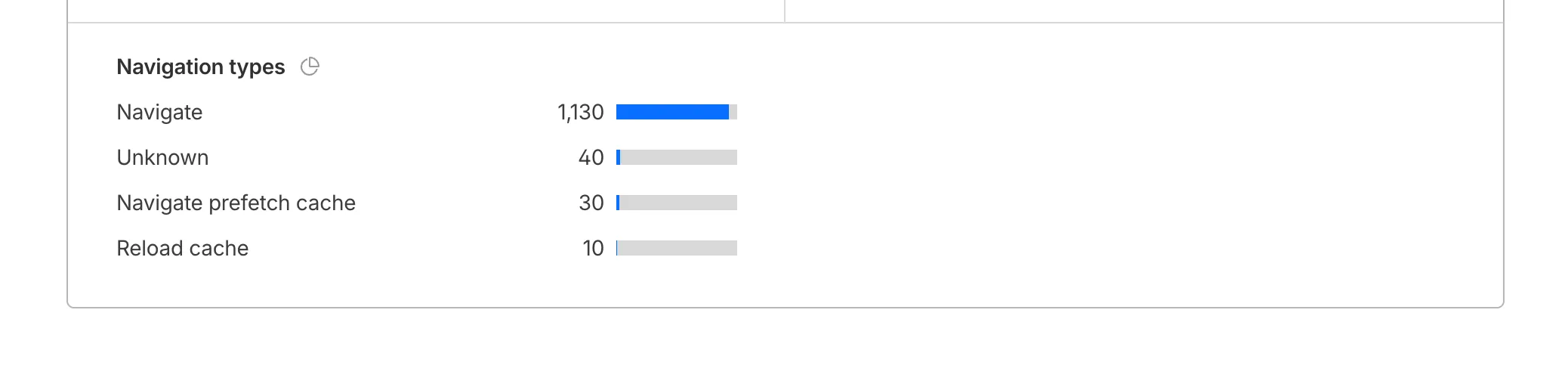
You can now find the Navigation Type dimension in the Web Analytics dashboard. You can filter to include/exclude one or more specific types using "equals", "does not equal", "in", or "not in" matchers.
To check the list of popular navigation types, select Page views on the Web Analytics sidebar and scroll down to the bottom:
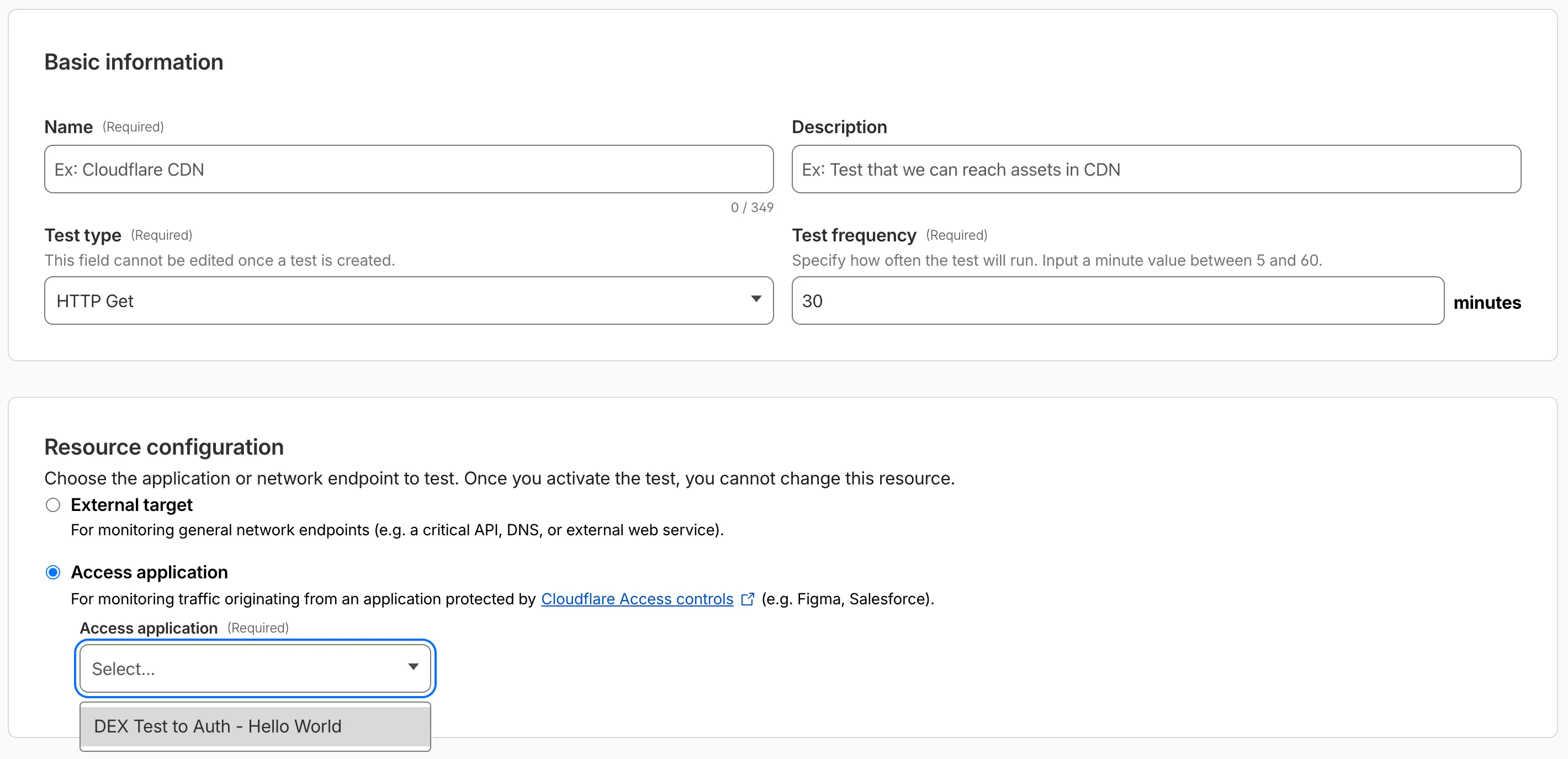
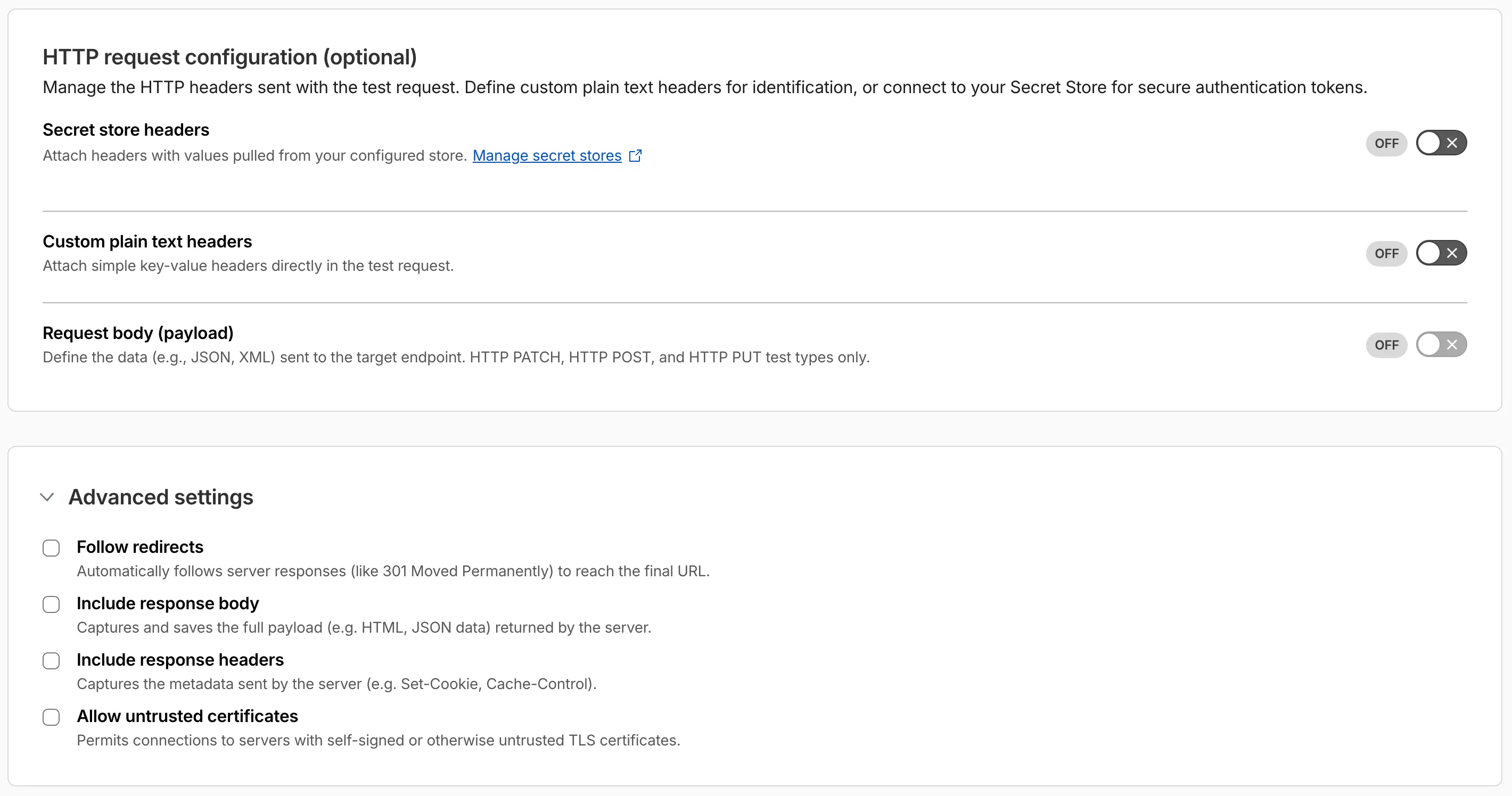
Digital experience tests now support testing applications protected by Cloudflare Access or third-party authentication. All authentication secrets are managed via Cloudflare Secret Store.
Digital experience tests also have enhanced configuration options including:
- New HTTP methods (DELETE, PATCH, POST, PUT)
- Secret Store headers, custom plain text headers, and custom request bodies
- Advanced settings: follow redirects, response bodies, response headers, and allow untrusted certificates