
Lifecycle of a Durable Object
This section describes the lifecycle of a Durable Object.
To use a Durable Object you need to create a Durable Object Stub. Simply creating the Durable Object Stub does not send a request to the Durable Object, and therefore the Durable Object is not yet instantiated. A request is sent to the Durable Object and its lifecycle begins only once a method is invoked on the Durable Object Stub.
const stub = env.MY_DURABLE_OBJECT.getByName("foo");// Now the request is sent to the remote Durable Object.const rpcResponse = await stub.sayHello();A Durable Object can be in one of the following states at any moment:
| State | Description |
|---|---|
| Active, in-memory | The Durable Object runs, in memory, and handles incoming requests. |
| Idle, in-memory non-hibernateable | The Durable Object waits for the next incoming request/event, but does not satisfy the criteria for hibernation. |
| Idle, in-memory hibernateable | The Durable Object waits for the next incoming request/event and satisfies the criteria for hibernation. It is up to the runtime to decide when to hibernate the Durable Object. Currently, it is after 10 seconds of inactivity while in this state. |
| Hibernated | The Durable Object is removed from memory. Hibernated WebSocket connections stay connected. |
| Inactive | The Durable Object is completely removed from the host process and might need to cold start. This is the initial state of all Durable Objects. |
This is how a Durable Object transitions among these states (each state is in a rounded rectangle).
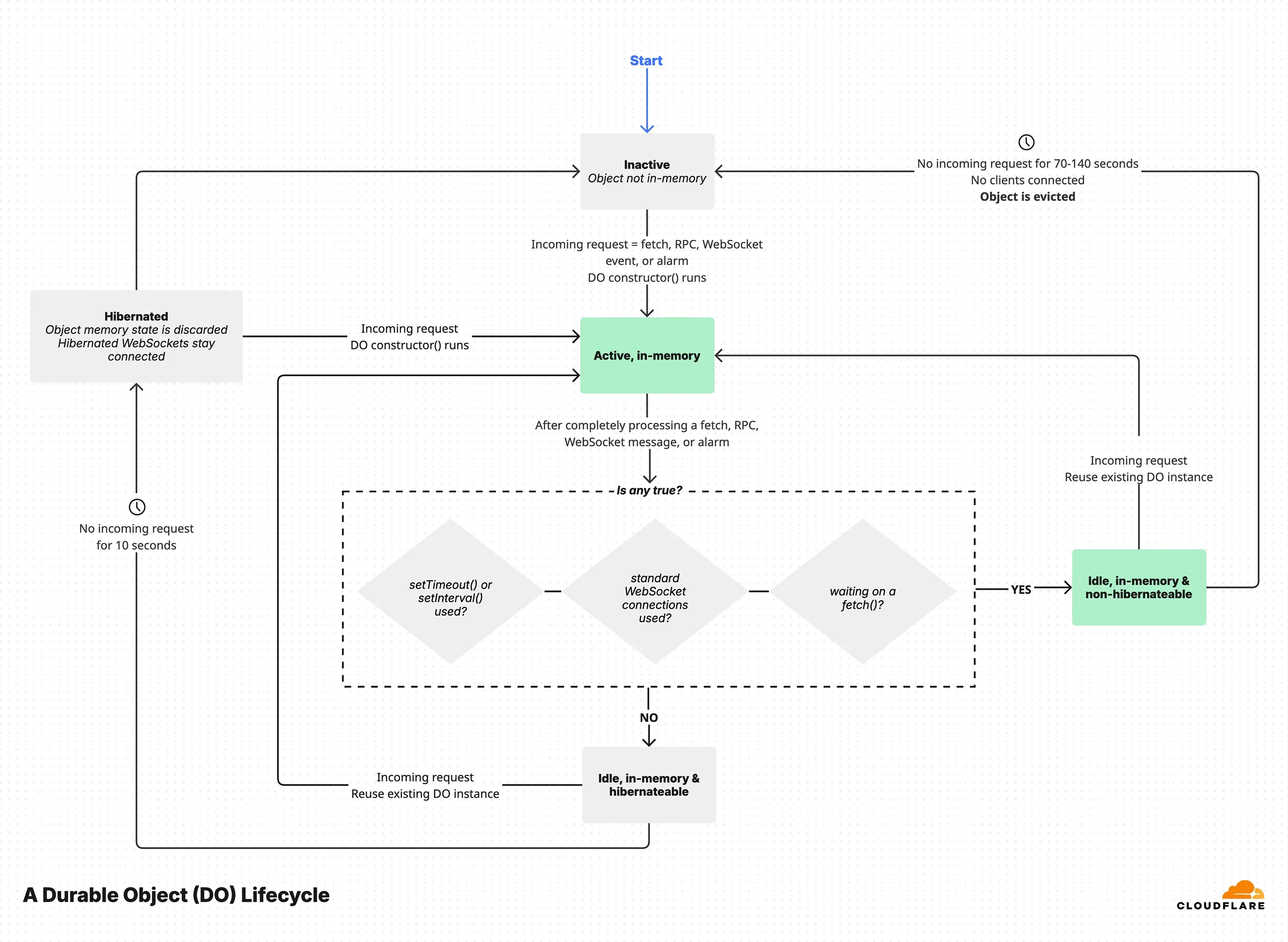
Assuming a Durable Object does not run, the first incoming request or event (like an alarm) will execute the constructor() of the Durable Object class, then run the corresponding function invoked.
At this point the Durable Object is in the active in-memory state.
Once all incoming requests or events have been processed, the Durable Object remains idle in-memory for a few seconds either in a hibernateable state or in a non-hibernateable state.
Hibernation can only occur if all of the conditions below are true:
- No
setTimeout/setIntervalscheduled callbacks are set, since there would be no way to recreate the callback after hibernating. - No in-progress awaited
fetch()exists, since it is considered to be waiting for I/O. - No WebSocket standard API is used.
- No request/event is still being processed, because hibernating would mean losing track of the async function which is eventually supposed to return a response to that request.
After 10 seconds of no incoming request or event, and all the above conditions satisfied, the Durable Object will transition into the hibernated state.
If any of the above conditions is false, the Durable Object remains in-memory, in the idle, in-memory, non-hibernateable state.
In case of an incoming request or event while in the hibernated state, the constructor() will run again, and the Durable Object will transition to the active, in-memory state and execute the invoked function.
While in the idle, in-memory, non-hibernateable state, after 70-140 seconds of inactivity (no incoming requests or events), the Durable Object will be evicted entirely from memory and potentially from the Cloudflare host and transition to the inactive state.
Objects in the hibernated state keep their Websocket clients connected, and the runtime decides if and when to transition the object to the inactive state (for example deciding to move the object to a different host) thus restarting the lifecycle.
The next incoming request or event starts the cycle again.
Durable Objects will occasionally shut down and objects are restarted, which will run your Durable Object class constructor. This can happen for various reasons, including:
- New Worker deployments with code updates
- Lack of requests to an object following the state transitions documented above
- Cloudflare updates to the Workers runtime system
- Workers runtime decisions on where to host objects
When a Durable Object is shut down, the object instance is automatically restarted and new requests are routed to the new instance. In-flight requests are handled as follows:
- HTTP requests: In-flight requests are allowed to finish for up to 30 seconds. However, if a request attempts to access a Durable Object's storage during this grace period, it will be stopped immediately to maintain Durable Objects global uniqueness property.
- WebSocket connections: WebSocket requests are terminated automatically during shutdown. This is so that the new instance can take over the connection as soon as possible.
- Other invocations (email, cron): Other invocations are treated similarly to HTTP requests.
It is important to ensure that any services using Durable Objects are designed to handle the possibility of a Durable Object being shut down.
When your Durable Object code is updated, your Worker and Durable Objects are released globally in an eventually consistent manner. This will cause a Durable Object to shut down, with the behavior described above. Updates can also create a situation where a request reaches a new version of your Worker in one location, and calls to a Durable Object still running a previous version elsewhere. Refer to Code updates for more information about handling this scenario.
Durable Objects may shut down due to deployments, inactivity, or runtime decisions. Rather than relying on shutdown hooks (which are not provided), design your application to write state incrementally.
Shutdown hooks or lifecycle callbacks that run before shutdown are not provided because Cloudflare cannot guarantee these hooks would execute in all cases, and external software may rely too heavily on these (unreliable) hooks.
Instead of relying on shutdown hooks, you can regularly write to storage to recover gracefully from shutdowns.
For example, if you are processing a stream of data and need to save your progress, write your position to storage as you go rather than waiting to persist it at the end:
// Good: Write progress as you goasync processData(data) { data.forEach(async (item, index) => { await this.processItem(item); // Save progress frequently await this.ctx.storage.put("lastProcessedIndex", index); });}While this may feel unintuitive, Durable Object storage writes are fast and synchronous, so you can persist state with minimal performance concerns.
This approach ensures your Durable Object can safely resume from any point, even if it shuts down unexpectedly.